
If you use Claude Code, you’ve probably seen “Running agent” scroll past while Claude works, followed by a short task name. You didn’t ask for it. Claude started a helper, let it do a side job, and carried on.
That happened in my sessions for months, and I never asked for a single one. When I finally went looking for the reason, part of it was sitting in a folder on my Mac: 28 subagent files, installed back in March by a plugin called Everything Claude Code, plus a rule telling Claude to use them “PROACTIVELY” with “No user prompt needed.” The rules still recommended Sonnet 4.6 and Haiku 4.5. I’d hired a crew of 28 without noticing, and they were working from a six-month-old handbook. I switched the plugin off.
So I went and learned how they work. This guide covers what they are, why Claude starts them, how to ask for one yourself, and how to set one up on Haiku 5.5, Anthropic’s new small model, for jobs where the answer is easy to check.
Quick answers
| Question | Short answer |
|---|---|
| What is a subagent? | A helper Claude starts for one side job. It works in its own space and hands back a summary. |
| Why does Claude start them on its own? | To keep long reading (files, search results, logs) out of your main chat. Subagent files that say “use proactively” invite it too. |
| Can I ask for one? | Yes. Say “use a subagent to…” in plain English, or @-mention one by name. |
| Do they cost anything? | They count toward the same usage limits as your main chat. |
| Which model do they run on? | Claude’s built-in helpers usually use your main chat’s model. Your own can be set to a cheaper one. The finished row in your chat (desktop app) or /tasks (terminal) shows which. |
| When is Haiku 5.5 the right pick? | When you could check its answer at a glance. |
What a subagent is
A subagent is a helper Claude Code starts for one side job. It gets a short brief from Claude, does the work in a separate space, and returns a summary. Then that space is thrown away.
The point is your chat’s context: the working memory Claude has for the current conversation. Every file Claude opens and every search result it reads lands in that memory and stays there. Read forty files in your main chat and most of the memory is now filled with forty files you’ll never look at again. Send a subagent to read them and only the summary comes back. (For a plain-English refresher on terms like context, see AI Terms Explained: 15 Words You’ll Hear When You Start Building With AI.)
| Your main chat | A subagent | |
|---|---|---|
| Sees your conversation | Yes | No. It only gets the brief Claude writes for it |
| Where the reading goes | Into your chat, where it stays | Into its own space, which is discarded |
| What you get back | Everything | A summary |
| Model | The one you picked | Your main model, unless its file names another |
| Usage | Counts toward your limits | Counts toward the same limits |
A subagent lets Claude read a lot without remembering all of it.
Two things get mixed up with subagents. A separate Claude session you can talk to is its own feature (see How to Have One Claude Session Control Another). And the /list-agents command lists the helpers and sessions you can send messages to right now; mine showed only my other Claude sessions. Your saved subagents live in the agents folders covered below. The names overlap, which doesn’t help.
Why a crew of small helpers works
The how-to is the easy half. The reasons are what tell you which jobs to hand over.
Thinking and doing are different jobs. Reading forty files, sorting a pile or pulling one number out of a report takes a lot of words and very little judgment. Your main model’s attention is the scarce thing. Hand the pile to a crew and the boss keeps its attention for deciding and writing. Anthropic’s own launch graphic for the new models captions Haiku 5.5 “Speed and efficiency” and Sonnet 5.5 “For well-scoped work”, in a LinkedIn post by Daniela Amodei, Anthropic’s President. Well-scoped is the key word.
Many cheap tries beat a few expensive ones. Anthropic’s developer account, @ClaudeDevs, showed this on X on 7 October 2026 with an egg. Agents had one kit of household items and had to design a carrier that kept an egg intact at increasing drop heights, up to a 32-metre goal. Both setups reached 32 metres. Opus 5.5 working alone took 3 minutes 37 seconds, tried 25 designs and cost $0.47. Opus 5.5 directing ten Haiku 5.5 subagents took 58 seconds, tried 86 designs and cost $0.14.
The demo ran on Anthropic’s Managed Agents platform, a different product from Claude Code, so it tells you nothing about your own files. What it shows is the shape of the idea: lots of cheap attempts in parallel, one capable model picking the winner.
Anthropic names the everyday jobs. Its Haiku 5.5 announcement lists summaries, compactions, database queries and classification as the quick, repetitive, high-volume work it’s built for. A compaction is what happens when a long chat nears its memory limit and Claude summarises the older part to make room. One partner, Rogo, describes a Haiku 5.5 subagent that “pulls the segment revenue line the deck needs” from a company’s annual report while a larger model builds the presentation. The big model makes the deck; the crew fetches the numbers.
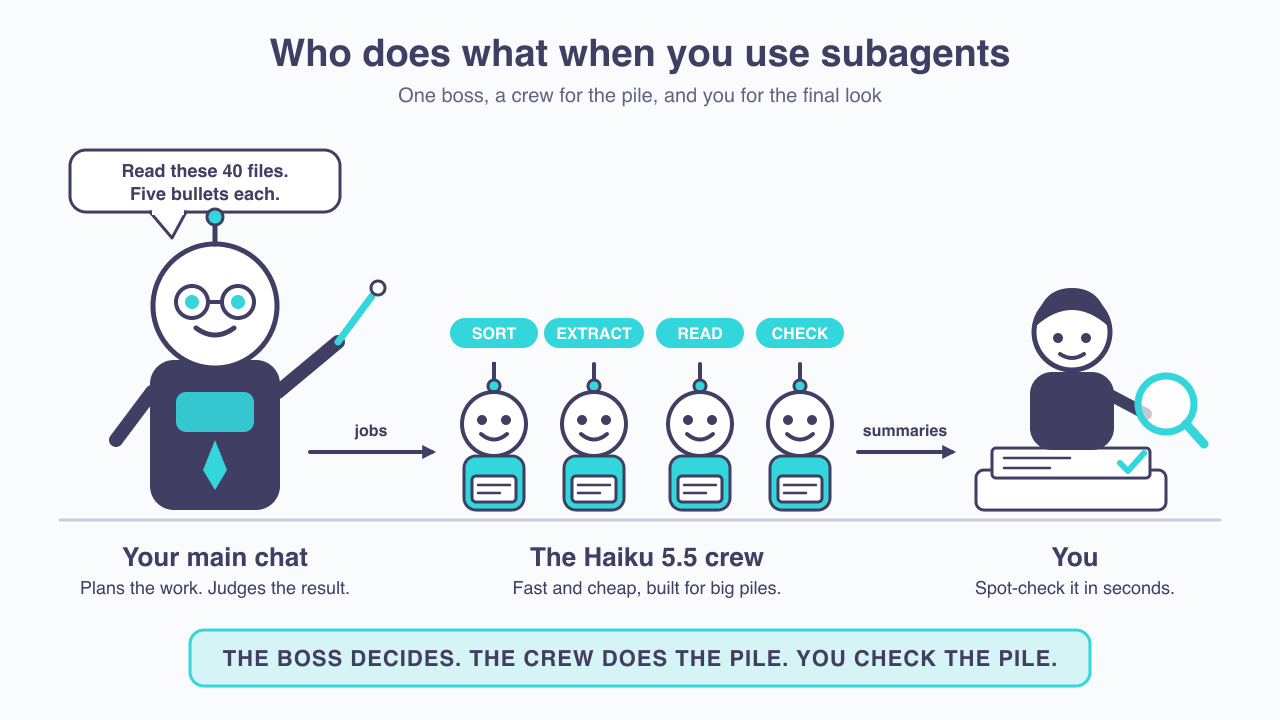
The boss decides. The crew does the pile. You check the pile.
See what’s already happening in your sessions
Before you ask for one, it helps to recognise the ones Claude already starts.
- In the chat, the desktop app shows “Running agent” followed by the task, such as “Running agent: Lint the vault wiki”. When it finishes, the row changes to “Ran agent” and adds the model it ran on: “Ran agent: Lint the vault wiki, Opus 5.5”. The terminal version shows the helper’s name and task instead, like
Explore(Search for meeting notes).

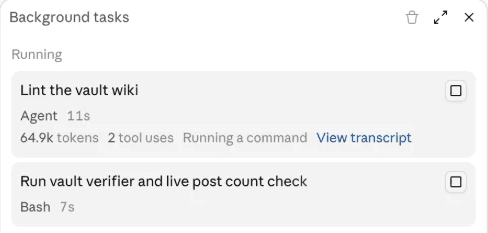
- The Background tasks panel in the desktop app lists each running subagent, marked “Agent”, with the tokens it has used, how many actions it has taken, what it’s doing right now, and a link to its transcript. Background commands appear in the same list, marked “Bash”. In the terminal, background subagents get a row in a small panel below the prompt box.
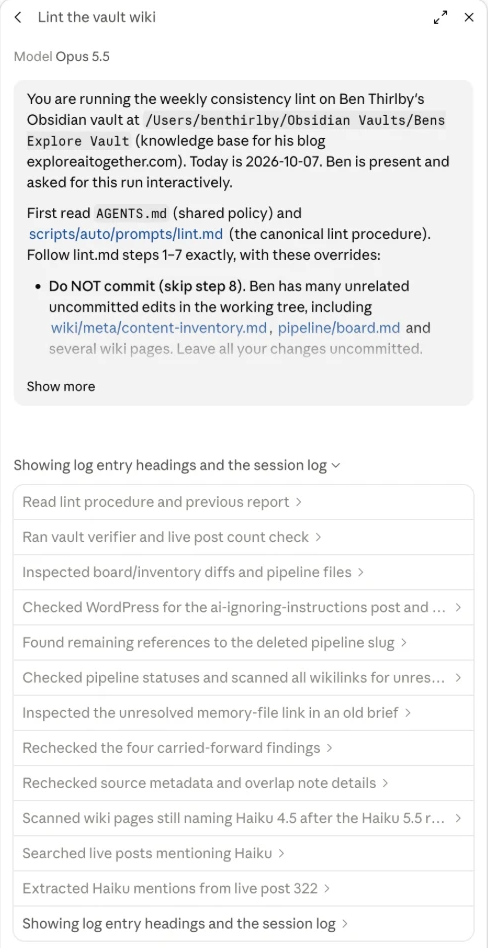
- Click a task in that panel (or View transcript) to open its detail view. The top shows the model it’s running on, then the full brief Claude wrote for it, then a step-by-step list of what it has done.
/tasksin the terminal lists what’s running and names the model on each subagent’s row (Claude Code v2.1.242 or later).- The agents folders hold any subagents you or a plugin installed:
~/.claude/agents/for all your projects, and.claude/agents/inside a project for that project only. This is where I found my 28. If you’ve installed plugins or “starter kits”, look here and read thedescriptionline of anything you didn’t write. A description that says “use proactively” is an open invitation for Claude to launch it. /agentsused to open a setup wizard. Now it tells you the wizard has been removed and points you to two options: ask Claude to create or update subagents, or edit the files in those two folders.

/usage: Anthropic’s docs say it can break recent plan usage down by subagent. Mine showed no subagent line, in a session that hadn’t run any, so don’t count on seeing one.
Claude’s built-in Explore helper, the one that searches your files, runs on your main chat’s model. If you work in Opus, your file-searching helper is Opus too.
Ask for one on purpose
My first deliberate one was a single sentence: I asked Claude to lint my wiki (check my notes for broken links and loose ends) using a subagent. It worked for a few minutes, ran 17 commands, updated two report files and came back with three findings, including that one of my published posts still listed Haiku 4.5. Then the main chat did something I didn’t ask for: it checked the subagent’s file changes against my version history before reporting back. The boss checked the crew’s work, which is the habit to copy.
There are three ways, from easiest to most setup:
- Plain English. Start a request with “Use a subagent to…” and Claude will hand the job off.
@-mention a saved one. Type@and pick the subagent from the list, the same way you’d mention a file. That guarantees that specific helper runs.- Make your own. Covered in the Haiku setup below.
Two prompts you can paste and adapt:
Use a subagent to read every file in the Meeting Notes folder. For each file, give me five bullets on what was decided and one direct quote that supports them. Report only what the notes say, no opinions.
Start three subagents, one for each of these folders: [Folder A], [Folder B], [Folder C]. Each one should find every mention of [topic] and return a one-paragraph summary with the file names it used. Then compare the three summaries and tell me where they disagree.
Put everything that matters in your request. The subagent doesn’t see your conversation, only the brief Claude writes for it. My wiki request was one sentence. When I opened the subagent’s detail view, the brief Claude had written ran to several paragraphs: where the files were, which procedure to follow, not to commit any changes because I had unsaved work, which old report to check against, and what to report back. Reading it is the fastest way to check the helper was told what you meant. If you told Claude an hour ago to ignore the Drafts folder, the subagent doesn’t know that unless your request says it again.
When it’s worth it
Two tests, one for each decision:
- Subagent or not? Use one when the job produces a lot of reading you won’t need again and only the summary matters.
- Cheap model or not? Use Haiku when you could check that summary at a glance. If you’d have to reread the source to trust the answer, keep the job on your main model.
A folder of meeting notes you want summarised passes both. Rewriting a proposal in your voice passes neither: it needs your whole conversation and real judgment.
On cost: subagents draw from the same usage limits as your main chat, and several running at once draw several times as fast. My wiki-checking subagent had used 64.9k tokens eleven seconds in, after just two actions, and its detail view said it was running on Opus 5.5, the same model as my main chat. A subagent saves room in your chat. The usage still adds up. (If you’ve hit a limit mid-task before, Claude Usage Limit Reached? Here’s What Actually Happens — and How to Keep Working covers what to do.)
Set up a cheap one on Haiku 5.5
Haiku 5.5 came out on 7 October 2026. It’s Anthropic’s small, fast model and the first Haiku with effort levels: a setting for how hard it thinks before answering. On Anthropic’s API it costs $0.10 per million input tokens (a token is roughly three-quarters of a word) and $0.50 per million output tokens, against $1 and $5 for Haiku 4.5, according to Anthropic’s Haiku 5.5 overview. On a Pro or Max plan you don’t pay per token, and Anthropic hasn’t published how much further a Haiku subagent stretches a plan.
1. Update Claude Code
In Claude Code, the shortcut haiku means Haiku 5.5 only from version 2.1.293, and only on Anthropic’s own service, per Anthropic’s model configuration guide. When I checked, my terminal copy was on 2.1.267, so this step applied to me. In the terminal:
claude updateIf you reach Claude through Amazon Bedrock, Google Cloud or Microsoft Foundry, haiku still means Haiku 4.5 there. Use the full Haiku 5.5 model ID your provider lists instead.
2. Ask Claude to write the subagent
You don’t have to write the file yourself. Paste something like:
Create a user subagent called note-reader. It reads the documents I point it at and returns five bullets per document, each with one direct quote from that document. It can read and search files but must not edit anything. Use model haiku with effort medium. In the description, say to use it when I ask for summaries of many documents.
3. Read the file it wrote
Claude saves it in ~/.claude/agents/ (available in every project) or in your project’s .claude/agents/ folder. It will look roughly like this:
---
name: note-reader
description: Reads many documents and returns five bullets per document, each with one direct quote. Use when the user asks for summaries of a folder or a stack of files.
tools: Read, Glob, Grep
model: haiku
effort: medium
---
You read documents and report what they say. For each file, give five bullets and one direct quote that supports them. Do not add opinions or information that isn't in the file.- name: what you call it by.
- description: when Claude should use it. This line decides whether Claude ever reaches for it on its own.
- tools: what it’s allowed to do. Read, Glob and Grep are read and search only, which is the safe default.
- model: which model runs it.
- effort: how hard it thinks. Leave it out and it uses your session’s setting.
- The text underneath: the instructions the subagent works from.
Check that model and tools say what you asked for. Those two lines are the ones that matter.
4. Use it
Name it in a request (“Use note-reader on everything in the Meeting Notes folder”) or @-mention it. If the description fits what you ask, Claude may pick it without being told.
5. Confirm the model and spot-check the first result
In the desktop app, the finished row in your chat names the model after the task (“Ran agent: note-reader …” followed by the model name), and clicking the subagent in the Background tasks panel shows “Model” at the top of its detail view. In the terminal, run /tasks while it’s working; the subagent’s row names the model. Then take one file and check its bullets and quote against the original. If the quote isn’t in the file, the job isn’t checkable enough for Haiku yet.
6. Tune it
- Effort:
lowfor sorting,medium(the default) for most reading jobs,highwhen it must follow your instructions to the letter. - Long jobs: if it stops partway through a big folder, add “keep going until every file is done” to its instructions.
- Anything with dates: if it searches the web, tell it today’s date.
You write the job description once. The file remembers it.
Four jobs for a Haiku crew
Every one of these has an answer you can check in a minute.
| Job | What you hand it | How you check it | Starting effort |
|---|---|---|---|
| Sorter | A pile of files, notes or emails, plus the categories you want | Open three items from each category | low |
| Extractor | A stack of documents and the one figure, date or name you need from each | Check two or three against the source | low |
| Reader squad | A stack of documents; one summary per document with a supporting quote | Search the file for the quote | medium |
| Checker | A draft plus its sources; flag numbers, names and links that don’t match | Every flag points at a line you can look at | high |
The Sorter is the same job as tidying a folder by hand, done faster; How to Organize Your Messy Downloads Folder with AI (Claude Cowork Guide) walks through the categories. The Extractor is the Rogo pattern: your main chat writes the report, the crew pulls the numbers. The Checker finds mismatches; deciding which ones matter stays with you, and Don’t Let an AI Grade Its Own Homework — Use a Second Model to Review covers why a second reader helps.
What not to hand it
- Judgment calls. Which option to choose, what to cut, how something should sound. Keep those in your main chat.
- Steps that depend on each other. If step two needs step one’s answer, splitting them across helpers only adds hand-offs.
- Anything you can’t check quickly. The second test exists for exactly this.
- Sensitive topics. Haiku 5.5’s safety filters on cybersecurity and biology are stricter than Haiku 4.5’s, so a job like summarising a folder of lab protocols may come back refused. Keep those on your main model.
- Anything that relies on what you said earlier. The subagent only knows its brief. Restate the rules in the request.
Honest limits
I wrote this the day Haiku 5.5 came out, from Anthropic’s subagent documentation and announcements. I haven’t run a Haiku crew on a real project yet, so treat the four jobs as starting points to test. The egg-drop numbers come from a vendor demo on a different product. And nobody has published how much further a Haiku subagent makes a Pro or Max plan go.
What I can say from my own setup: check your agents folder. Mine had 28 helpers I didn’t remember installing, with instructions written for older models.
Common questions
What is a Claude Code subagent?
A helper Claude Code starts for one side job. It works in its own memory space, doesn’t see your conversation, and returns a summary to your main chat.
Why does Claude start subagents on its own?
To keep long reading out of your main chat. Claude also launches a subagent when your request matches its description, especially if the description says “use proactively”. Plugins can install subagents and rules that encourage this.
Can I tell Claude to use a subagent?
Yes. Start a request with “Use a subagent to…”, or type @ and pick a saved subagent by name.
Can a subagent use a cheaper model than my main chat?
Yes. Set model: haiku (or a full model ID) in the subagent’s file. To see which model it ran on in the desktop app, look at the finished “Ran agent” row in your chat or open its detail view from the Background tasks panel. In the terminal, run /tasks while it’s working.
Does haiku mean Haiku 5.5 everywhere?
No. In Claude Code it means Haiku 5.5 from version 2.1.293 on Anthropic’s own service. On Amazon Bedrock, Google Cloud and Microsoft Foundry it still means Haiku 4.5, so use the full model ID there.
Where to go next
If you find yourself writing the same instructions into every subagent request, that’s a sign they belong in a skill instead: Stop Re-Explaining Yourself to Claude — Build a Skill Instead.
Before you hand anything to the crew, ask one question: could I check this in a minute?