
For two years, anyone who typed in the address of a local disc golf course and campground near me got a locked “enter password” screen. The owners had a domain, an old login nobody could remember and no idea where to start.
Less than a week after my first prompt, boylanacres.com was live. It has six pages, tee-time and camping requests, an events list and hosting that costs nothing. It was my first website for someone else, and it went much better than I expected.
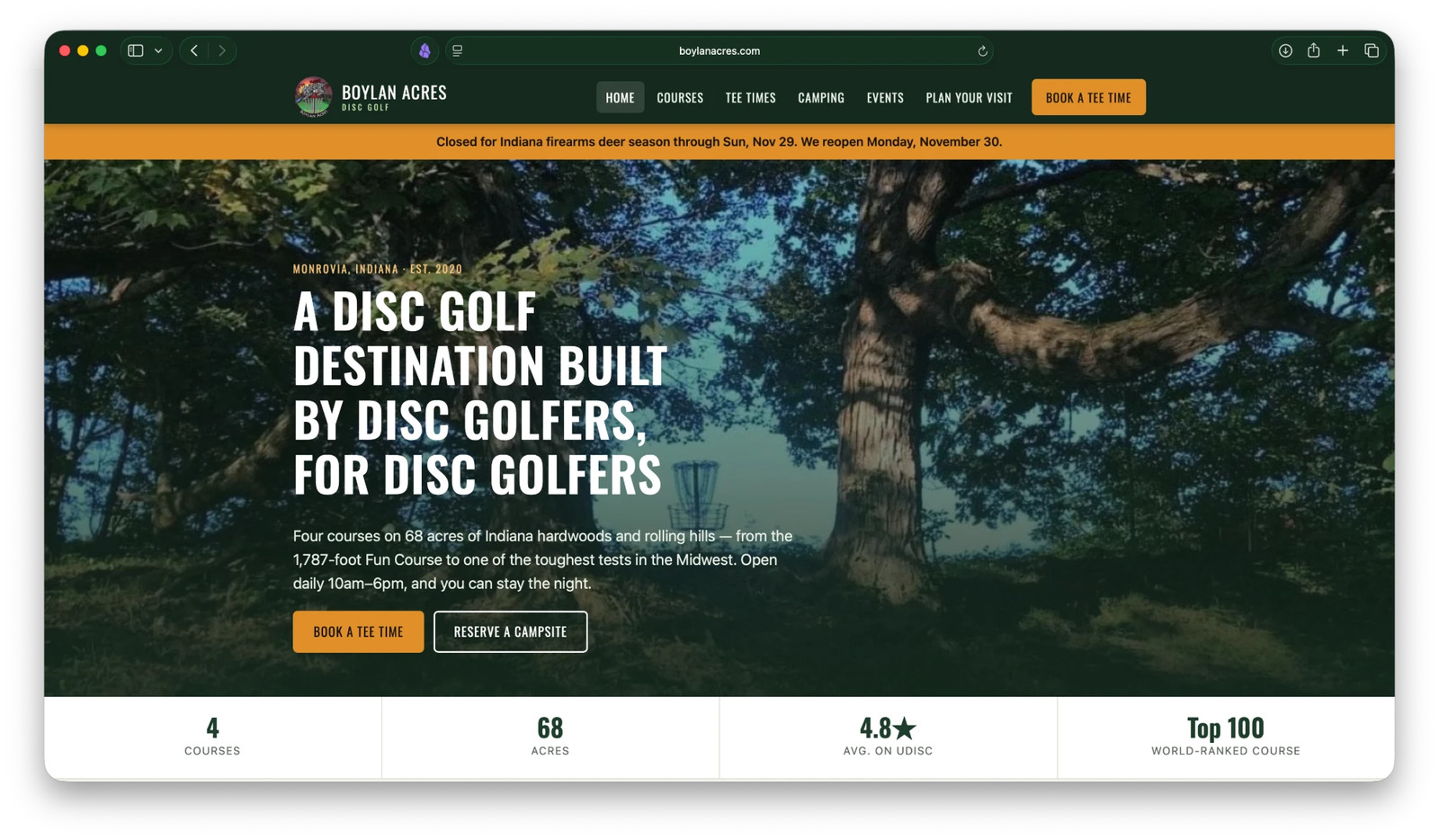
The code was the easy part. AI wrote nearly all of it. What decided whether the site shipped was everything around the code: the owner’s time, accounts nobody remembered and one system that had to keep running. So this guide is built around the customer. Here’s the process I’d follow again to build a website with AI for a local business, with the prompts and the traps.
Customer first means two customers
When you build a site for a small business, you’re serving two groups of people.
The owner. They’re busy, they probably aren’t computer people, and every minute you take from them is a minute they aren’t running the business. You want their logins, their decisions and their knowledge. You don’t want them sitting next to you while you fiddle with fonts.
The owner’s customers. They visit the site to do a few specific things. For a disc golf course, that’s booking a tee time, checking hours and prices, finding out whether it’s open this weekend and getting directions. Every page should make one of those jobs easier.
That gives you the rule the whole process follows: build the draft before you meet, then spend the owner’s time only on what needs them in person.
What you need
- An AI coding tool that works on your own computer. I used Claude Code in the Claude desktop app, with ChatGPT and Codex helping on the side during launch. Either works; Codex vs Claude Code compares them. If you’ve never built anything, start with How to Vibe Code: A Beginner’s Step-by-Step Guide.
- A free GitHub account. GitHub stores the site’s files and every version of them. It’s also what the free host pulls from.
- Voice dictation. The built-in dictation on your phone or Mac is enough.
The last two did more for this project than any prompt. Working locally with GitHub meant every change was saved, could be undone and went live with one push. Dictation let me capture huge amounts of detail, intent and context without writing anything up first. The owner answered most of the detailed questions on site, out loud, and I pasted the transcript straight in.
Website words you’ll run into, like repo, DNS and static site, are in The Vibe Coder’s Dictionary.
Step 1: Start from a site they already like
Ask the owner for one website they wish theirs looked like. This owner pointed to another disc golf property’s site because he liked how visitors could book directly from it.
Then ask the AI to look at how that site actually works before you promise anything. A feature that looks custom is often a link to an outside service, or a tool the owner already has access to. Knowing that up front can turn a big build into a small one.
The site they admire shows you what they want. Check how it works before you decide what to build.
Step 2: Build the draft before you meet
Don’t walk into the first meeting with a blank page. Build a rough draft from what’s already public: their Facebook page, Google listing, reviews and photos. Then let the AI ask you what it needs.
My opening prompt was one paragraph describing the situation, and it ended with “Please ask me a few questions to get started.” Here’s a reusable version of it:
I'm helping a local business owner build a new website. Here's the situation:

- The business: [what they do, where]
- Their current site: [URL, and what's there now]
- What they want visitors to be able to do: [book, buy, find hours, etc.]
- A site they like: [URL, and what they like about it]
- What I know they don't want: [e.g. an online store]

I'm meeting them on [day]. Before then, I want a working draft I can show them on my phone, so we spend the meeting on details instead of starting from scratch. Set up a GitHub repo and build the draft.

Anything you don't know yet (prices, hours, policies, their story), put a clearly marked placeholder on the page instead of guessing. Please ask me a few questions to get started.
Claude asked four questions: how booking should work, where the site would be hosted, whether the repo should be public or private, and what real content I had. Then it built a five-page draft that evening. Its course details came from public course listings, and every unknown was highlighted in yellow, so nobody could mistake a guess for a fact.
That same evening it drafted an email to the owner: the plan for the day, the decisions we’d make with pros and cons, a list of things to gather (photos, prices, hours, camping details, rules) and a screenshot of the draft homepage. I reviewed it in Gmail and sent it.
A yellow placeholder is better than a confident guess. The owner can fix a highlighted blank in two seconds, but a wrong price nobody notices goes live.
Step 3: Do the detective work the night before
The night before the meeting, I asked Claude to make me as prepared as possible. I told it what I didn’t know (hosting, and how to get the draft online) and that the meeting needed to be short.
Expect this research to turn up something useful. Small-business accounts get set up years apart, often by different people, so the domain, the hosting and the logins are rarely where everyone assumes. Finding that out the night before is much easier than finding it out in front of the owner.
Here’s the prompt to ask before your first meeting:
Before I meet the owner, find out everything you can about their current website setup:
- Where the domain is registered and when it expires
- Where the current site is hosted and what visitors see today
- Whether email is set up on the domain
- Anything that could break, or cost them money, if we switch

Then give me a short plan for the meeting: only the things that need the owner in person, like logins, verification codes and decisions. Everything else they can send me later.
Ten minutes of research the night before keeps the meeting short.
Step 4: Keep the meeting short: logins, codes, decisions
Three things need the owner in person:
- Logins. Password resets and verification codes go to their phone and email.
- Decisions. Where to host, how booking works, who handles updates.
- Their OK to switch it on.
Prices, hours, policies and photos can come later by text.
Bring a one-page printed checklist. I nearly printed my full prep notes, and Claude pointed out the problem: they had notes meant only for me, like my own talking points and a reminder to decide my fee first. It made a separate one-page checklist that was fine for the owner to see, and I emailed him a copy.
Two small things saved me a second visit:
- Get added as a manager, then check billing while the owner is still logged in. On Squarespace, a domain manager can change DNS but can’t see auto-renew or the card on file. We checked both while he was logged in, and added a new card.
- Show the draft on your phone. The owners immediately asked for an Events page and a notice for the weeks the property closes for Indiana’s firearm deer season. Claude built the closure notice so the site works out each year’s dates and shows the notice by itself. Nobody has to remember to update it.
The owner’s time is the scarcest resource on the project, so spend it only where you need them.
Step 5: Let them talk, and paste it all in
This is where dictation paid off. Instead of handing the owner a form, I turned on voice dictation and let him answer my questions out loud: rates, hours, campsites, check-in times, pets, fires, quiet hours, waivers, memberships, what the pro shop stocks. I pasted the raw transcript into Claude, typos and all, and told it to hold while more came.
The AI did three jobs with that mess:
- It fixed transcription errors. It corrected a misheard disc brand (“Castoplast” became Kastaplast) and the business’s own name.
- It flagged contradictions. An older text from the owner gave one course as par 74, and his spoken answer said par 72. His intro said three courses, while the site listed four, one of them a combination course. Claude checked with me before using either number.
- It saved everything to a notes file before touching the site, so no answer got lost between messages.
The owner also had a block of text he already sends customers, describing each course and the year it opened. I saved it word for word and gave it to Claude as a source. It settled a course name that two public listings spelled differently.
Your owner already knows everything the site needs. Your job is to capture it in their words.
Step 6: Ask what every account does before you cancel anything
The first plan said to cancel Shopify, since the owners didn’t want to sell discs online. Then we logged in together, and the owners explained that Shopify was the register for the pro shop on the property. They use it for every in-person sale.
Cancelling it would have shut down their checkout. The AI didn’t know, because nobody had told it. Once I did, the plan changed: only the website moved, and Shopify kept running the register. A domain change doesn’t touch the register app.
Before you cancel or change anything, ask the owner directly:
“What do you use this for, day to day?”
Ask it for every account you find. The AI only knows what you tell it.
Step 7: Pick the boring host, and leave the owner owning everything
A small business site that changes a few times a year doesn’t need WordPress, Squarespace or a store platform. Plain HTML files on a free static host work well. A static site is just pages, with no database and no plugins to update.
I used Cloudflare Pages. The free plan has no bandwidth or request limits for static sites and allows 500 builds a month (Cloudflare’s limits page). It also redeploys the site automatically every time you push to GitHub. The owner’s only running cost is the domain.
My own blog runs on WordPress, so I asked about that too. Claude’s answer was the best one-liner of the project: my site is a blog I post to all the time, while his is five pages that change a few times a year. With static hosting there’s nothing to update, nothing to get hacked and no monthly bill.
Set up the accounts so the owner owns everything:
- The owner owns the domain, the hosting account and any booking accounts, all under their own email.
- You’re added as an admin. On Cloudflare, the Administrator role covers the website and DNS but can’t change billing or add people, so the owner stays in charge.
- Send site email to a business inbox. Before launch we moved every form and email link off the owner’s personal address and onto the course’s own Gmail.
Expect a wait when you switch the domain. You point the domain at the new host by changing its nameservers, and our switch from the old site took six to eight hours to show up. Cloudflare says registrars can take up to 24 hours to process the change (Cloudflare’s nameserver guide). Tell the owner before you start, so a blank afternoon doesn’t look like a broken site.
If the owner ever wants to take it over or hand it to someone else, everything is in their accounts, and the files are standard HTML anyone can work with.
Step 8: Launch clean
Before you switch the domain over, remove every placeholder from the live pages. A yellow “photos coming soon” box looks unfinished to a customer.
I asked Claude to move each one into a separate backlog file in the project. The two left over were more photos and a course map. The backlog is also where the owner’s bigger ideas went. He wants a section that collects videos filmed on the property and photos on the homepage that rotate. They’re good ideas, and they can wait for version two.
I'm publishing this site soon. Find every placeholder note on the pages and move each one into a BACKLOG.md file, with enough detail to pick it up later. Then remove them from the pages and check that none are left.Launch the version you can finish, and write down the rest.
What to charge
I didn’t charge for this one. I love my local disc golf community and was glad to help, and I get a free membership out of it. It was also my first outside customer, and I had no idea how it would go.
Afterward I asked Claude what a first-timer would normally charge for this. It suggested roughly $750 to $1,500 for the build, plus $25 to $75 a month if you handle updates. It said these were rough figures from general knowledge, not a survey, so treat them as a starting point for your own research. Trade also works: a membership, camping weekends, store credit.
Settle it before the first meeting either way. The owner will probably ask.
What I’d warn you about
- Upkeep is its own skill. Today the owner texts me changes, and I make them with Claude, commit and push. That works, but I don’t think it’s the most efficient way to maintain a site yet, and I’m still learning that part. Have a plan for updates before you launch.
- The owner can’t edit the site themselves. That’s the trade-off for free, simple hosting. If they want to make their own changes, you’ll need to add a simple editor later or move to a site builder.
- Email request forms are fragile. Our tee-time and camping requests open the visitor’s email app. That works on most phones, but not every one. A form service or a real booking tool is the upgrade.
Quick checklist
Before the meeting:
- Ask for a site they like, and check how its features actually work
- Build a draft with marked placeholders, from public info
- Find the domain, its registrar, its expiry date and what’s live now
- Email the owner the plan and a list of what to gather
- Decide what you’ll charge
At the meeting:
- Logins and verification codes
- Get added as manager or admin, then check billing and auto-renew while they’re logged in
- Hosting and booking decisions
- Ask “what do you use this for?” about every account
- Show the draft on your phone and dictate their answers
Before launch:
- Move placeholders and wish-list ideas to a backlog
- Send email to a business inbox
- Warn the owner that the domain switch can take hours
The first site is the hardest because you’re learning the accounts, the domain and the owner all at once. If you’d like to turn this into something you charge for, Boring AI Side Hustles That Actually Work in 2026 is a good place to weigh it against other options.