

You’ve heard about vibe coding. Maybe you saw Collins Dictionary named it the 2025 Word of the Year. Maybe someone showed you an app they built “without knowing how to code.” It sounds almost too good to be true.
But there’s a gap between reading about vibe coding and actually doing it. That’s what this guide is for.
I’m not a software engineer. I don’t have a computer science degree. But using the method in this guide, I built ChainMate— a scientific training app for disc golf. Real features, real users, real value. If I can do it, you can do it.
Here’s the secret: the hottest new programming language is English. You already know the language. You just need to learn how to speak it to a computer.
What you need: A browser. All tools are free. You can use Claude Code Web if you want to skip installation entirely.
By the end of this guide, you’ll understand the setup I use, the mental model that makes it work, and how to build your first web app — something you can use on your phone and computer, and share with anyone.
Think Like a Director, Not a Programmer
Traditional coding is like being the cameraman, lighting tech, sound engineer, and actor — all at once. You handle every detail yourself, line by line.
Vibe coding is different. You’re the director.
Your job is vision and feedback. You describe what you want to see. The AI handles execution — writing the code, figuring out technical details, making it work.
The core loop:
Describe what you want → AI generates the code → You test it → You refine by describing what’s wrong → Repeat until you’re happy
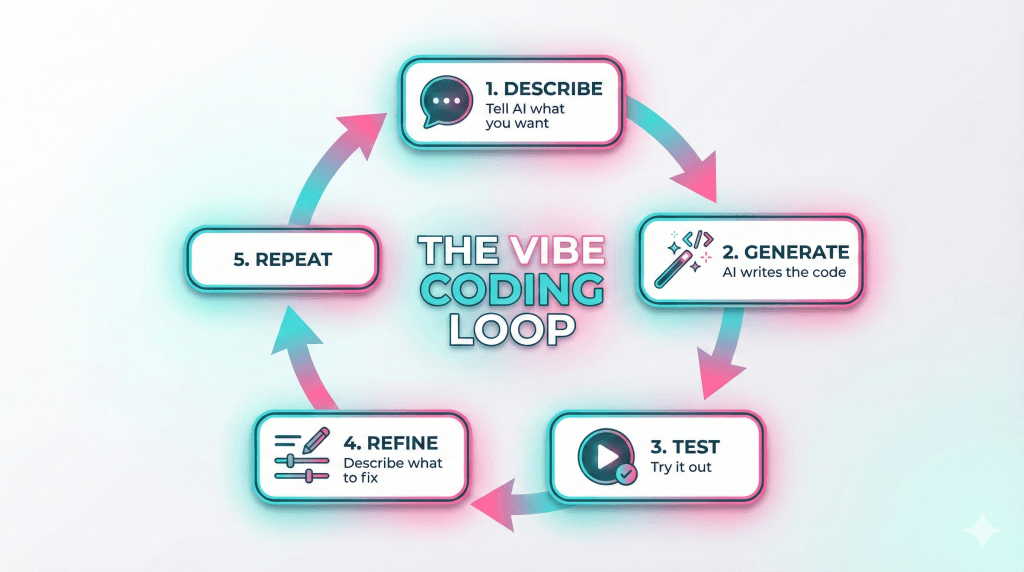
That’s it. You’re not memorizing syntax. You’re not debugging semicolons. You’re communicating a vision and refining the result.
Here’s something that might surprise you: professional developers worry about “clean code” and “technical debt.” You don’t need to. Your only question is: does it work? Give yourself permission to have messy code if the app functions. You can always improve it later.
The skill you’re building isn’t programming. It’s communication. The clearer you describe what you want, the better results you get. And that skill transfers everywhere.
Why Build a Web App First?
When people imagine building an app, they picture something in the App Store. An icon on their phone. Downloads and ratings.
Here’s a better path: build a web app.
What’s a web app? An application that lives in your browser — Chrome, Safari, Edge. Access it by typing a URL. No app store required. Works on phones, tablets, laptops, desktops — anything with a browser.
Why web apps win for beginners:
- One codebase works everywhere
- No app store approval process
- Instant updates — change something, everyone sees it immediately
- Free hosting (we’ll use Vercel)
- Easier to build and deploy
“But I want an app on my phone!” A web app IS on your phone. Save it to your home screen — it gets its own icon and opens full-screen without the browser bar.
On iPhone: Open in Safari → tap Share → “Add to Home Screen” On Android: Open in Chrome → tap menu → “Add to Home screen”
This is called a Progressive Web App. For your first several projects, it’s plenty. Native apps can come later.
The Tools I Actually Use
Everything here is free. You don’t need all of these to build your first project — but knowing the strengths helps when you’re stuck.
The AI Council
Your most valuable asset isn’t one AI. It’s knowing which AI to ask for what. I think of this as having a council of advisors.
Claude (claude.ai) — The Architect
Big-picture thinking. Planning. Strategy.
- “How should I structure this project?”
- “What are the tradeoffs between approach A and B?”
- “Explain this concept to me.”
Use Claude to make a plan before you start building.
Claude Code (CLI or Web) — The Builder
The hands-on worker. Reads your actual files, writes code, runs commands, builds things.
- “Build this feature.”
- “Fix this bug.”
- “Add a new page.”
If you’ve never used a command line, start with Claude Code Web — no setup required.
Gemini & ChatGPT — The Advisory Council
Second opinions. When Claude suggests an approach, paste it to Gemini or ChatGPT:
- “Claude suggested this. Any concerns?”
- “Is there a simpler way?”
Each AI has blind spots. Running important decisions past 2-3 models catches mistakes. It’s like consulting multiple experts before a decision.
The Technical Stack
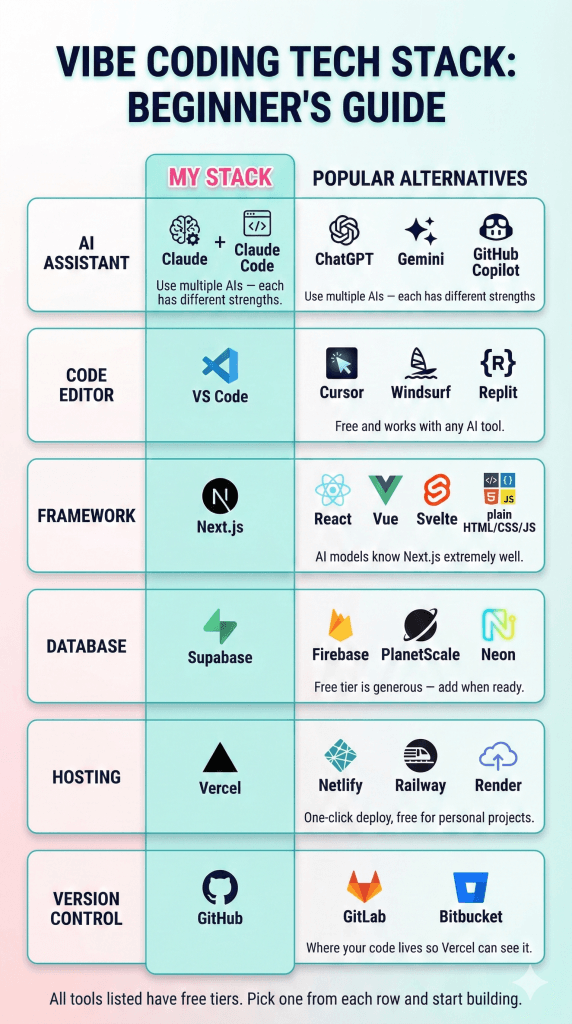
VS Code — Your workspace. Free code editor where your files live. Download from code.visualstudio.com.
Node.js — The engine that runs your app. Install once from nodejs.org (LTS version), then never think about it again.
Next.js — The framework for building web apps. Popular, well-documented, and AI models know it extremely well.
GitHub — Where your project lives online. More on this below.
Supabase — Database and user authentication when you need them. Free tier is generous.
Vercel — Puts your app on the internet. Connect your code, click deploy, get a real URL.
GitHub: The Bridge Between Your Code and Vercel
You don’t need to become a “Git expert.” Just know this:
GitHub stores your code online so Vercel can deploy it.
Here’s the honest truth: GitHub can be the trickiest part of this whole process. Claude Code Web creates its own branch that needs to be merged, and even after 30+ projects, I still sometimes need help figuring out the push/pull workflow.
My recommendation: Use ChatGPT for GitHub troubleshooting. For whatever reason, it has the best grasp on repository management — branches, merging, push/pull conflicts, all of it.
Here’s the basic workflow:
- Make a free account at github.com
- After Claude Code builds your project, you’ll need to push it to GitHub and handle any branch merging
- When (not if) you hit a snag, paste the error or describe the situation to ChatGPT: “I’m trying to push my code to GitHub and I’m seeing [error]. How do I fix this?”
- Once your code is on GitHub, Vercel can deploy it
Be persistent. Expect this part to be a bumpy ride the first few times. It gets easier, but even experienced developers google Git commands regularly. You’re not doing anything wrong — Git is just genuinely confusing.
The good news: once your code is on GitHub, the Vercel deployment part is smooth. Connect your repo, click deploy, done.
Your First Project: Something That Matters to You
The only criteria that matters: Build something you actually want to exist.
When you care about the outcome, you push through frustration. When you don’t care, you quit at the first error message.
Ideas to spark imagination:
- Personal tracker (habits, workouts, water intake, mood, spending)
- Decision helper (“what should I eat?” randomizer, priority sorter)
- Quick reference tool (unit converter, tip calculator, recipe scaler)
- Simple game (trivia on a topic you love, word puzzles)
- Personal dashboard (weather, motivational quote, today’s priorities)
- Collection organizer (books read, movies to watch, places to visit)
Think bigger if you want. User accounts? Database? Multiple pages? The AI council can guide you through any of it.
My example: ChainMate started because I needed to track disc golf putting practice. Personal problem, personal solution. That motivation carried me through every bug.
Your assignment: Pick ONE idea. Write one sentence describing what it does. That’s your starting point.
Let’s Build Something
We’re building a “Dinner Decider” — an app that helps you choose what to eat when you can’t decide. It has input (meal options), logic (random selection), and output (the result). Simple, useful, and it touches all the basics.
Step 1: Plan with Claude (5 minutes)
Open claude.ai. Describe your idea:
I want to build a simple web app that helps me decide what to eat for dinner.

Features:
- A list of meal options I can customize
- A big "Decide for me" button that randomly picks one
- Ability to remove options I'm not feeling today
- Clean, friendly design that works on my phone

I'm a beginner using Next.js. What's the simplest approach? Don't write code yet — just explain the plan.
Read through Claude’s response. You don’t need to understand every technical detail — just the general shape of what will be built.
Step 2: Council Check (The “Iron Sharpens Iron” Phase)
Copy Claude’s plan. Now, open a fresh chat with a different AI (I recommend Gemini or ChatGPT).
Quick Definition: What are UX and UI? You’ll see these terms a lot. Think of your app like a house:
- UI (User Interface): The paint, the furniture, and the doorknobs. It’s what it looks like.
- UX (User Experience): The floor plan. Does the kitchen connect to the dining room? Do the doors open the right way? It’s how it works.
The Prompt: Paste the plan into the new AI and ask:
“Claude suggested this approach for a meal picker app: [paste the plan]. As my expert advisor, what advice would you give on the UI (the visual style) and the UX (the ease of use)? Are there better modern practices I should use? Be critical.”
Why do this? I call this the “Iron Sharpens Iron” rule. Claude is the architect, but Gemini (especially the latest versions) is brilliant at “vibe checks” and catching flow issues. By bouncing the plan off a second “councilor,” you catch blind spots before you start building. If they both agree, you move forward with total confidence.
Step 3: Build with Claude Code (15-20 minutes)
Open Claude Code (CLI or web). This is where construction happens:
Create a Next.js web app for deciding what to eat.

Features:
- Shows 8 default meals (pasta, tacos, stir fry, etc.)
- Big "Decide for me" button in the center
- Clicking it randomly selects one meal and displays it prominently
- I can remove meals by clicking an X next to them
- I can add new meals to the list
- Warm, friendly colors
- Works well on mobile

Single page. No database — store the list in the app.
Watch it build. You’ll see files being created. Claude Code may give you a preview window or instructions to run locally — both are normal. Look at the result, not the code.
Step 4: Test and Refine (10 minutes)
Click around. Try everything.
- Does the button work?
- Does removing meals work?
- Does it look okay on a narrow screen?
Something won’t be right. That’s expected. This is where you refine.
Be specific in feedback:
Instead of: “Make it look nicer.” Try: “The button is too small on mobile. Make it larger with more padding and rounded corners.”
Instead of: “It’s not working.” Try: “When I click Decide, nothing happens. It should randomly pick a meal and show it in big text.”
Each refinement is a small conversation. Describe → Fix → Test → Repeat.
Step 5: Push to GitHub (2 minutes)
Ask Claude Code:
Initialize git, create a new GitHub repo called dinner-decider, and push the code there.
Done. Your code now lives online where Vercel can see it.
Step 6: Deploy to Vercel (3 minutes)
Ask Claude Code:
Help me deploy this to Vercel so I have a public URL.
Or go to vercel.com, sign up free, click “Import Project,” select your GitHub repo, and deploy.
You’ll get a real URL like dinner-decider.vercel.app. Open it on your phone. Share it with someone.
You built a web app. It works on any device. It has a real URL. You did this without writing code yourself.
Prompts That Get Results
“Plan First, Code Later”
Explain your approach first. Don't write any code yet.
Use with Claude before handing to Claude Code. Prevents jumping into implementation before you understand the plan.
“Give Me Options”
Give me 3 approaches, simplest first. Explain tradeoffs. Don't code yet.
Use when you’re unsure how to do something.
“Council Check”
Claude suggested [X]. As a second opinion, what do you think? Any concerns?
Use with Gemini/ChatGPT after getting Claude’s recommendation.
“Fix This Error”
I'm seeing this error:[paste the full error message]
I was trying to: [what you were doing] What’s wrong and how do I fix it?
Always include the error AND what you expected.
“The Red Box Is a Prompt”
When you see a red error screen in your browser, don’t panic. Copy the text, paste it to the AI. The error is just the app telling you what it needs next.
“Simpler, Please”
This feels too complicated. What's the minimum that would work?
AI models sometimes over-engineer. Push back.
“Explain It”
I don't understand this file. Explain it in plain English.
Helps you learn gradually without reading code.
“Read First”
Before making changes, read these files:
- [filename]
- [filename]

Then [what you want to build].
Claude Code doesn’t remember previous chats. Telling it to read files first gives context.
When Things Go Wrong
Things will break. Errors will happen. Professional developers spend enormous time debugging. You’re in good company.
“It’s not doing what I asked.” Re-read your prompt. Was it clear? Try: “I wanted X but got Y. Here’s exactly what should happen.”
“I got an error message.” Copy the entire error — all of it. Give it to Claude Code: “What does this mean and how do I fix it?” AI is usually good at diagnosing its own mistakes.
“I made it worse trying to fix it.” Stop. Claude Code keeps history — look for ways to revert. Or start fresh. The second build is always faster than the first.
“No idea what’s wrong.” Step away for 5 minutes. Describe the problem out loud. Try a different AI for fresh perspective.
About those “I built this in 10 minutes” posts: They don’t show the 40 minutes of errors before that. Everyone struggles. The difference is persistence.
Your superpower: You can always start over. You can always ask for help. You have an AI council. That’s more support than developers had for decades.
Where Vibe Coding Leads Next
Take a moment. You built a web app. It works on any device. It has a real URL. You did this by describing what you wanted and refining the result.
That’s real. That’s a skill. And it grows from here.
Keep building. Add features to what you made. Start a second project. Try Supabase when you want to save data or add users. Each project teaches you something.
A note on shipping: Some talk about building a “minimum viable product” — the least you can get away with. I have a different philosophy.
Do your best from the start. Add that extra feature if it matters. Polish the details if you have time. You’re not racing against a budget or a deadline — you’re building something because you want it to exist. Ship something you’re proud of, not just something that technically works.
The bigger picture: As projects grow in complexity, pure vibe coding has tradeoffs worth understanding. I wrote about that in What is Vibe Coding? (And When You Need Something More).
For ChainMate, I eventually moved to Specification-Driven Development — a more structured approach for building apps that need to last. I’ll write about that process soon.
You’re not alone. Learning to build with AI is a journey, better with company. Explore AI Together is full of people at exactly this stage — building, learning, figuring it out together.
Now go build something.