
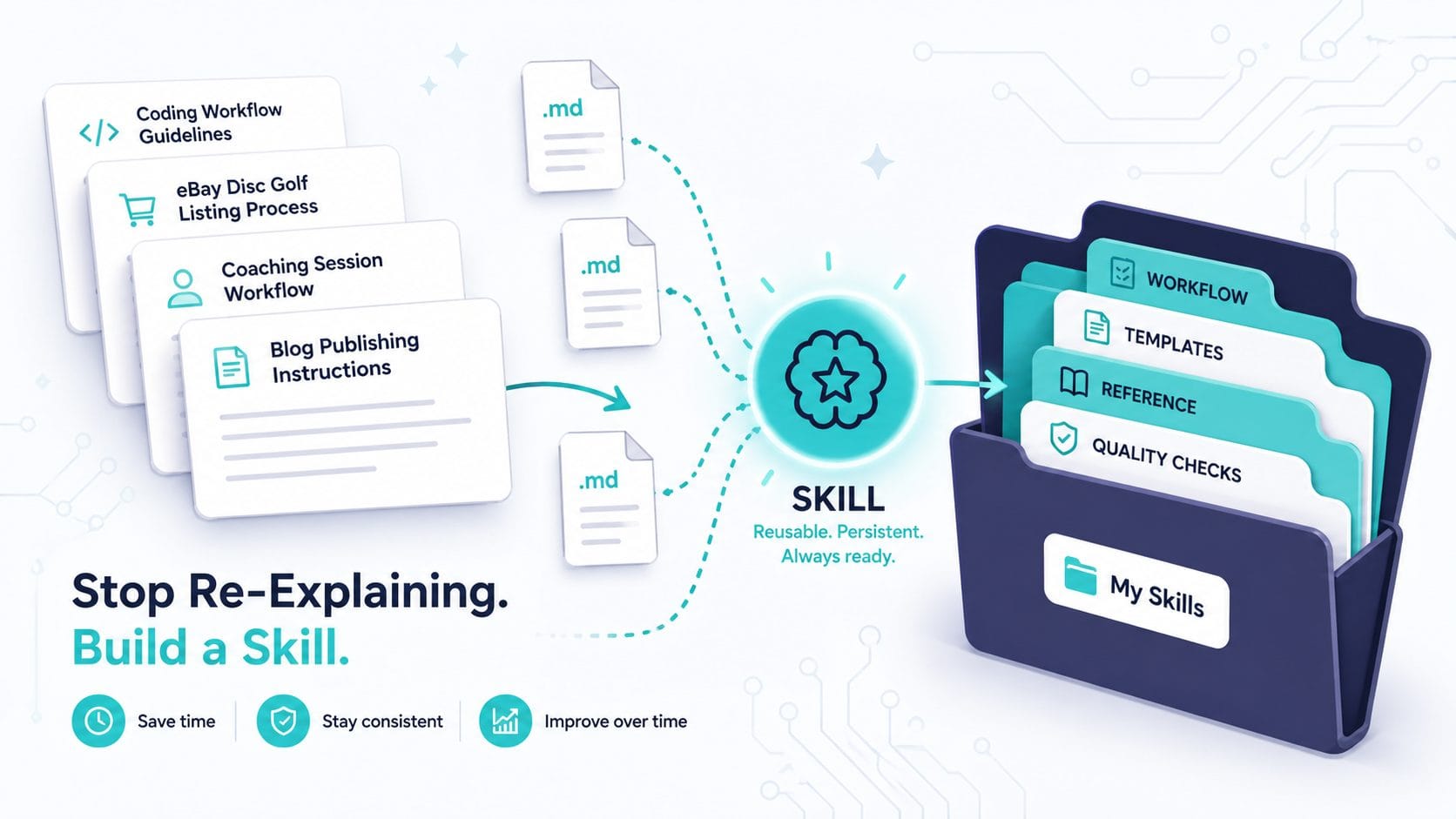
You’ve been here before. New chat. Same instructions. “Use this tone.” “Follow this format.” “Here are my brand colors.” Copy-paste from a note you keep somewhere. Maybe you’ve refined it over a dozen conversations, but Claude forgets everything the moment you start fresh.
It’s not a bug. It’s how large language models work — every session starts from zero. But it doesn’t have to feel that way anymore.
Claude Skills solve this by letting you write instructions once and have them persist across every conversation. And after spending months building, testing, and iterating on my own library of custom skills — for everything from blog publishing workflows to coaching check-ins to eBay disc golf listings — I can tell you the gap between “using Claude” and “using Claude with skills” is enormous.
Here’s what I’ve learned about building them well.
What a Skill Actually Is
A skill is a folder. At minimum, it contains a single markdown file called SKILL.md with a name, a description, and whatever instructions you want Claude to follow. That’s it. No coding required, no API calls, no terminal commands (unless you want them).
The description field matters more than you’d think. Claude reads every skill’s description at the start of a conversation to decide which ones are relevant. If your description is vague — “helps with writing” — Claude might ignore it when you ask for help drafting a newsletter. If it’s specific — “guides the post-draft publishing workflow for blog articles, including revision, SEO optimization, and image prompts” — Claude loads it exactly when you need it.
This is what Anthropic calls progressive disclosure: metadata loads first (~100 tokens), full instructions load only when relevant, and any supporting files load only when needed. It means you can have dozens of skills enabled without bloating every conversation.
The Difference Between a Prompt Library and a Skill
Before skills existed, the best you could do was maintain a collection of prompts — maybe in Notion, maybe in a text file — and paste the right one at the start of each conversation. That works, but it has real limitations.
A prompt library requires you to remember which prompt to use and when. Skills don’t. Claude reads the descriptions and makes the call for you. Ask it to create a presentation, and if you have a branded-deck skill enabled, it loads automatically. Ask it to review your article draft, and your publishing workflow skill kicks in without you mentioning it by name.
Skills can also include supporting files — templates, reference documents, example outputs, brand guidelines — organized in subdirectories that Claude accesses only when relevant. My publishing workflow skill, for example, includes image prompt formulas for two distinct visual styles (clean professional and vibrant creative) plus a decision matrix for which to use based on article type. That’s not something you’d paste into a prompt. It’s reference material that lives alongside the instructions and gets pulled in when needed.
The practical difference: prompts are instructions you give once. Skills are instructions that persist.
Where to Actually Find Skills (It’s Not Obvious)
Here’s something that tripped me up: finding where skills live in the Claude interface isn’t intuitive, and the location has shifted since launch. If you’ve been searching for a “Skills” button and coming up empty, you’re not alone.
On Claude.ai (web and desktop), skills live under Customize > Skills in the left sidebar. But there’s a prerequisite that’s easy to miss: you need “Code execution and file creation” toggled on first, which is under Settings > Capabilities. Without that enabled, the Skills section won’t appear. This catches a lot of people — they go looking for skills, don’t see the option, and assume it’s not available on their plan. It is. Free, Pro, and Max all have access. You just need that toggle flipped first.
Older guides and tutorials (including Anthropic’s own documentation from early 2026) reference a different path — Settings > Capabilities > Skills — so if you’re following a YouTube walkthrough and the navigation doesn’t match, that’s why. The UI reorganized, and the newer Customize section now groups skills, plugins, connectors, and scheduled tasks in one place.
In Cowork, click Customize in the left sidebar, then the “+” button to open the directory, then the Skills tab.
In Claude Code, skills are slash commands. Personal skills go in ~/.claude/skills/ (available across all projects) and project skills go in .claude/skills/ inside a specific repo (shared with anyone who clones it).
On mobile, the Customize menu may or may not be fully accessible depending on your app version — this is worth checking if you primarily use Claude on your phone.
Once you’re in the Skills section, you’ll see Anthropic’s built-in collection (document creation for Word, PowerPoint, Excel, PDF, plus a frontend design skill and an MCP Builder for generating API integrations). Toggle the ones you want, or upload your own by zipping a skill folder and hitting the “+” button.
The broader ecosystem has grown fast too. The SKILL.md format became an open standard that works across Claude Code, Cursor, Gemini CLI, and Codex CLI — not just Claude. Community marketplaces have popped up with thousands of contributed skills, indexed by category and install count. For teams, admins can provision skills organization-wide so they appear in every member’s skill list automatically.
What’s Worth Building (and What Isn’t)
After building about a dozen skills and using them daily, I’ve noticed a pattern in which ones actually stick and which ones sit unused.
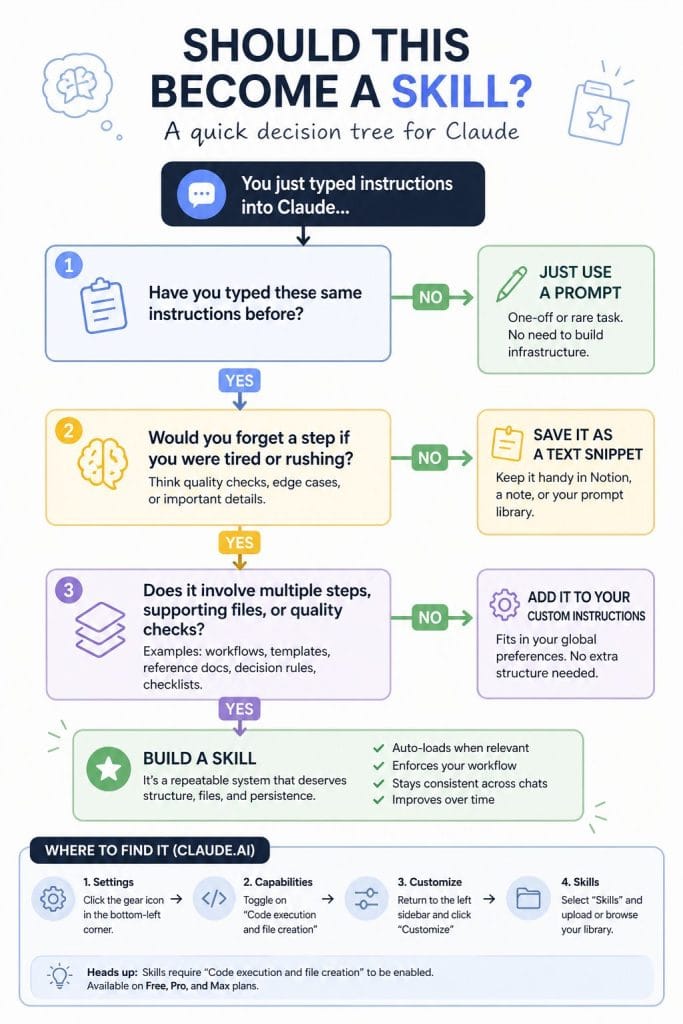
Skills that earn their keep solve problems you encounter at least weekly and involve multi-step workflows where you’d otherwise forget a step or cut corners. My blog publishing workflow skill, for example, enforces a specific revision process: style guide compliance check, comprehensive revision round, image strategy with A/B testing prompts, metadata bundle creation, and a publication readiness checklist. Without the skill, I’d skip the style guide check half the time and forget to write alt text. With it, every article goes through the same quality gates.
My Claude Code workflow skill captures hard-won lessons about working with an AI coding assistant — the branch permission quirks, the context-first prompting pattern, the importance of bite-sized steps with verification checkpoints. Every time I start a new coding session, those patterns are already loaded. I’m not re-learning the same lessons or re-explaining the same constraints.
Skills that don’t stick tend to be too simple (Claude already knows how to do them) or too rigid (you end up fighting the skill’s instructions more than following them). A skill that just says “write in a professional tone” adds almost nothing. A skill that encodes your specific editorial voice, your formatting preferences, your common mistakes to watch for, and your quality checklist? That compounds over time.
The signal that something should become a skill: you’ve typed the same set of instructions in three or more conversations. That’s the threshold where building the skill pays for itself within a week.
Check out my skill for blog publishing here
The Structure That Works
Every good skill I’ve built or encountered follows the same basic anatomy:
A specific description that tells Claude when to activate. Err on the side of being pushy — list trigger phrases, related topics, even edge cases where the skill should fire. Claude tends to under-trigger, so a description that says “use when the user mentions dashboards, data visualization, internal metrics, or wants to display any kind of company data” works better than “helps with dashboards.”
A clear workflow in the markdown body. Structure this as the steps Claude should follow in order, with decision points where relevant. My content research skill, for instance, has five distinct phases: define the target concept, generate extraction prompts, analyze outputs, plan the content cluster, then draft articles. Each phase has specific deliverables so both Claude and I know what “done” looks like.
Supporting files when the instructions get too long for one document. Anthropic recommends keeping the main SKILL.mdunder about 500 lines. If you need more, add reference files in subdirectories and tell Claude in the main file when to read them. This is how you handle domain-specific knowledge without bloating every conversation — Claude loads the reference only when the task requires it.
Quality gates — the checklist or verification step that runs before Claude considers the task complete. This is the part most people skip, and it’s the part that matters most. My publishing skill won’t mark an article as ready until it’s confirmed: word count in range, zero AI-sounding phrases, brand voice consistent, meta description under 150 characters, feature image selected, all internal links formatted. Without that checklist, half those items get missed.
Building Your First One
The fastest path is what I’d call the “reverse-engineering” approach. Find a conversation where Claude did exactly what you wanted — the formatting was right, the tone was right, the process was right. Then ask Claude to extract the pattern. Something like: “Look at this conversation. What instructions would you need at the start to produce this output consistently, without me re-explaining?”
The theme of reverse-engineering and having AI interview you shows up a lot in my recommended approaches and learnings, thanks mostly to Dylan Davis (check out his Youtube channel)
Claude will generate a draft skill. You’ll need to edit it — the first version is always too generic and too long — but it gives you a working structure in minutes instead of hours.
The alternative is the interview approach. Start with “I want to build a skill for [domain]. Interview me about my process.” Claude will ask about your triggers, your edge cases, your quality criteria, your anti-patterns. The conversation itself becomes the raw material for the skill. This takes longer but produces better results for complex workflows where you have deep expertise you’ve never fully articulated.
Either way, the iteration loop is the same: write the skill, test it against real prompts, notice where it fails or produces unexpected output, refine, repeat. Anthropic’s built-in skill creator (available through Customize > Skills) supports evaluation features — you can run parallel tests against different inputs to find where your skill breaks.
The Part Nobody Talks About: Maintenance
Skills aren’t static. The tools you reference change. Your own preferences evolve. The workflow you captured three months ago might have a step you’ve since eliminated or a tool you’ve since replaced.
I revisit my skills roughly monthly, usually triggered by a moment where Claude does something I don’t want anymore. That friction is the signal to update. The best skills include a “learnings capture” step at the end — a quick note about what worked and what didn’t — so improvement data accumulates naturally rather than requiring dedicated review sessions.
Team skills need even more deliberate maintenance. When one person builds a skill and provisions it org-wide, the shared version can drift from how the team actually works. The fix is simple: assign an owner to each skill and review quarterly.
What This Changes About How You Work
The deeper shift isn’t efficiency, though that’s real. It’s consistency. Before skills, my best prompting happened when I was focused and remembered all the nuances. My worst happened when I was tired or rushed and skipped steps. Skills flatten that variance. Even my laziest sessions run the same quality checks as my most disciplined ones.
That consistency compounds in ways that aren’t obvious at first. When every blog article goes through the same style guide check, you stop producing articles that “sound like AI.” When every coding session starts with the same context pattern, you stop losing work to merge conflicts. When every content research project follows the same extraction and clustering workflow, you stop reinventing the process each time.
Skills are how you stop re-explaining yourself. They’re also how you stop re-learning your own lessons.
Curious about skills but not sure where to start? Pick the one task you re-explain to Claude most often. That’s your first skill.
Also check out my related content: How to Make Claude Code Remember