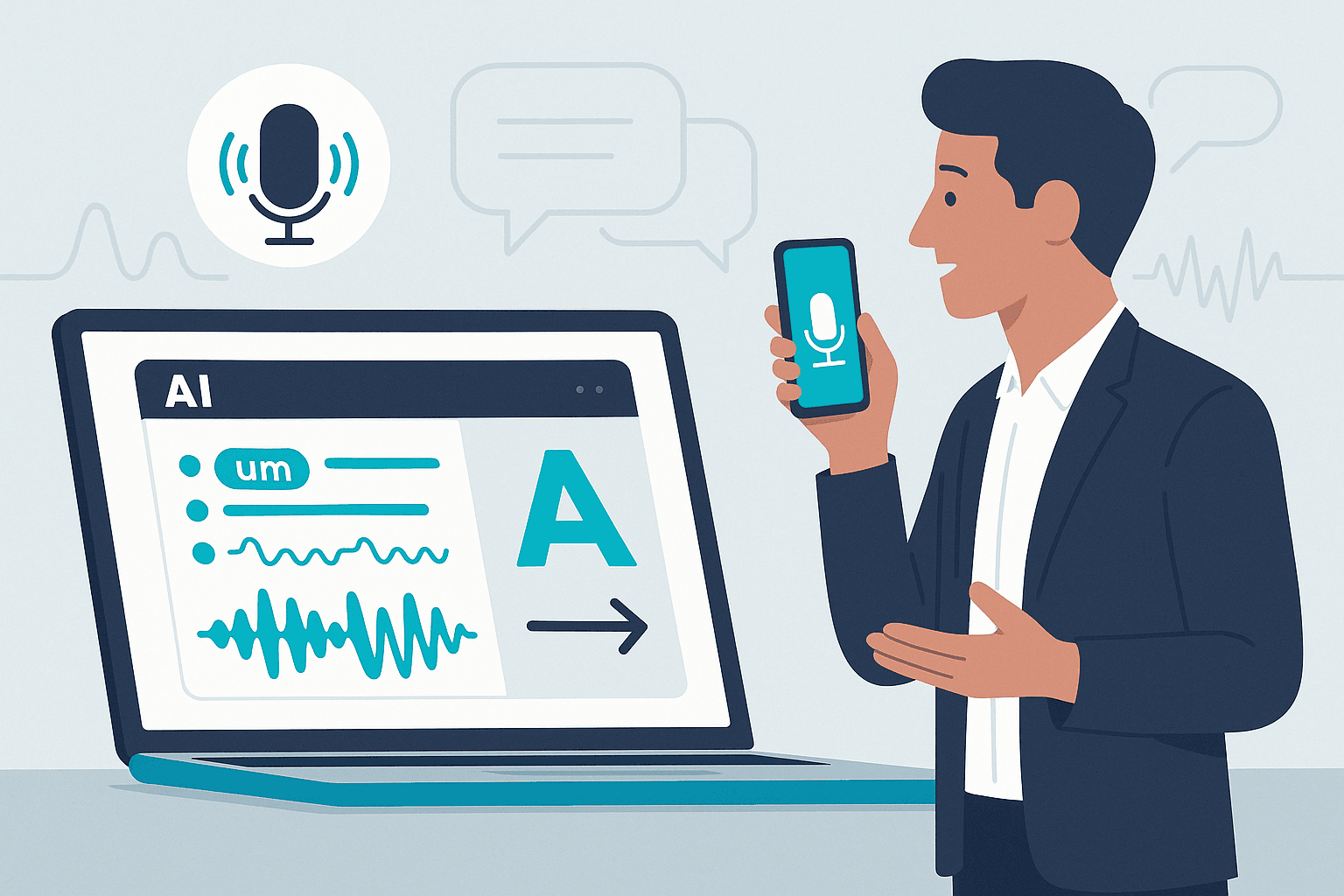
I recorded a presentation, uploaded the transcript to Claude, and asked for honest feedback on my delivery.
The response? “B/B+. You said ‘um’ 47 times in 10 minutes. Your pacing is erratic. Your conclusions don’t connect to your openings.”
Ouch. But also… useful.
Over the next three months, I recorded regularly, got AI feedback, and focused on improving one issue at a time. When I submitted a similar presentation three months later, the grade came back: A-.
Here’s the thing about corporate life: nobody tells you the truth about your presentations. Your colleagues say “that was good” even when it wasn’t. Your boss won’t mention that you sound uncertain. And hiring a professional speaking coach costs $200-500 per session.
AI won’t replace a human coach for high-stakes presentations. But it will catch the verbal tics, pacing problems, and confidence issues that undermine your credibility—the ones everyone notices but nobody mentions.
Here’s how to turn AI into your personal speaking coach and actually see measurable improvement.
The Case for AI Coaching (Not What You’d Expect)
Most people think AI coaching sounds cold and robotic. Turns out, that’s exactly what makes it valuable.
Brutally Honest (In a Good Way)
Your colleagues won’t tell you that you say “um” constantly. AI counts every single one and tells you exactly where your delivery falls apart. No politeness filter. No office politics. Just objective analysis of what you actually said and how you said it.
“AI told me I sounded ‘uncertain and meandering.’ It was right.”
Available Whenever You Need It
Want to practice at 6am before your commute? Sunday night before Monday’s big pitch? Five times in one day while perfecting a keynote? AI doesn’t have scheduling constraints, hourly minimums, or calendar conflicts.
The Objective Observer You Can’t Get at Work
Office dynamics complicate feedback. Politics, relationships, hierarchies—they all filter what people tell you about your presentations. AI evaluates what you said and how you said it, whether you’re the CEO or an intern.
Creates a Safe Practice Space
Recording yourself feels weird at first. Getting critiqued by AI feels worse. But there’s no audience, no judgment, no performance anxiety. You can mess up, sound terrible, and restart halfway through. The only one who knows is you.
The Cost Factor
Professional speaking coaches charge $200-500 per session. AI options run from free (ChatGPT, Claude free tiers) to $20/month for premium versions. Transcription tools range from free to $30 one-time or $17/month. Even at the high end, you’re spending less on unlimited monthly coaching than one human session.
AI vs. Human Speaking Coach: What You Get
| Dimension | AI Coach | Human Coach |
|---|---|---|
| Availability | 24/7, unlimited sessions | Limited schedule |
| Honesty | Brutally objective | Filtered by politeness |
| Cost | Free to $30/month | $200-500 per session |
| Filler Word Tracking | Precise counts | Subjective observation |
| Body Language Feedback | ❌ None | ✅ Detailed |
| Context Understanding | Limited | ✅ Deep |
| Best For | Regular practice, delivery mechanics | High-stakes prep, stage presence |
So, is AI actually any good at this? Let’s separate its superpowers from its blind spots.
Understanding AI’s Strengths and Limitations
What AI Excels At
AI becomes your detail-obsessed assistant who notices everything about your delivery:
Filler words – You’ll know exactly how many times you said “um,” “uh,” “like,” and “you know.” This alone can transform your presentations. When you realize you’re filling every pause with verbal tics, you can train yourself to use actual pauses instead.
Pacing analysis – AI tells you if you’re rushing through content, dragging through transitions, or speaking at inconsistent speeds. You’ll learn which sections you race through (usually because you’re nervous) and where you lose momentum.
Clarity and structure – Do your sentences make sense? Do your points connect logically? AI evaluates whether a listener could actually follow your argument. You’ll catch the moments where you assume knowledge, skip logical steps, or meander off-topic.
Confidence markers – The words you choose reveal how certain you feel. AI identifies hedging language (“kind of,” “sort of,” “maybe”), validation-seeking questions (“right?”), and minimizing words (“just,” “simply”) that undermine your authority.
Energy level – Does your language convey enthusiasm or apathy? AI picks up on monotone patterns, lack of variety, and the spots where your energy drops—usually after the first few minutes when nerves wear off.
The feedback is specific enough to act on. Not “work on your confidence” but “you used hedging language 23 times, primarily in sentences about pricing and competitive positioning.”
What AI Completely Misses
AI can’t see you, which means it misses body language, gestures, eye contact, facial expressions, and stage presence. If you’re clicking through slides too fast, making contradictory gestures, or ignoring audience reactions, AI has no idea.
It also can’t judge cultural context or appropriateness. AI might suggest you smile more during a serious presentation about declining revenue. It doesn’t understand the room, the relationships, or the subtext.
The Honest Assessment
AI won’t make you the next TED speaker. It won’t teach you stage presence or help you read the room. But it will catch the delivery issues that sabotage your credibility—the ones nobody else will mention but everyone notices.
Use AI for delivery mechanics and regular practice. Invest in a human coach for your most important presentations where body language, audience reading, and strategic content advice matter.
Your Step-by-Step AI Coaching Process
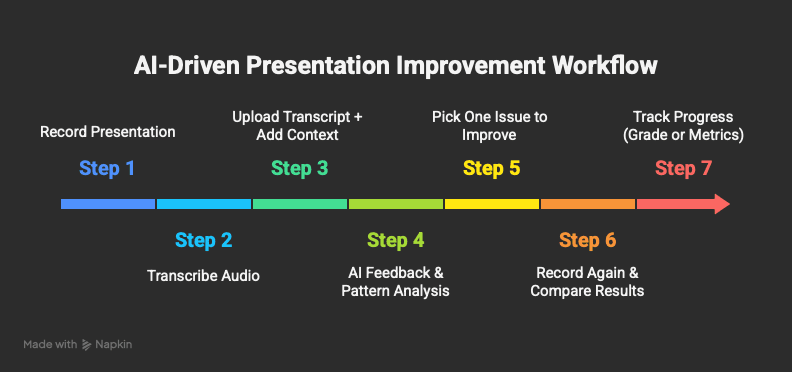
Step 1: Record Your Presentation
Start simple. You don’t need fancy equipment.
Record practice presentations (5-15 minutes works best), meeting presentations (with permission), pitch rehearsals, or even voice memos where you talk through your ideas.
Quick tips: Find a quiet space (background noise hurts transcription accuracy). Your phone’s voice memo app works fine to start. Keep segments under 20 minutes—longer recordings get tedious to analyze. Start with low-stakes practice before recording important meetings.
Step 2: Transcribe the Audio
You need text for AI to analyze. Poor transcription produces bad feedback—if “um” becomes “I’m,” the analysis falls apart. You need at least 90% accuracy for useful results.
Time expectations: A 5-minute recording takes 2-5 minutes to transcribe, depending on your tool. A 15-minute recording takes 5-10 minutes. (Tool options in the next section.)
Step 3: Upload Transcript and Provide Context
Here’s where most people waste AI’s potential. They upload a transcript and say “give me feedback.”
Better approach:
"I'm attaching a transcript of my Q4 product demo to potential enterprise
clients. This is a 10-minute presentation that needs to: (1) explain our
product clearly to non-technical buyers, (2) build confidence in our company,
and (3) create urgency for a next meeting.

Please evaluate my delivery on:
- Clarity and coherence (can a non-technical person follow this?)
- Confidence level (do I sound authoritative or uncertain?)
- Pacing (too fast, too slow, or appropriate?)
- Filler words (count them specifically)
- Energy and engagement (would this keep someone's attention?)

Grade me on an A-F scale and tell me the top 3 things I should improve.
Be brutally honest—I want to get better, not feel good."
Why this works: Context helps AI evaluate appropriately (sales demos need different analysis than technical presentations). Specific criteria produce specific feedback. Requesting a grade gives you something measurable. “Be brutally honest” actually changes the tone of the response.
Step 4: How to Iterate with AI Feedback
When AI responds, don’t just skim it. Actually analyze it.
Look for patterns, not one-off comments. You can’t fix everything at once, so prioritize the issues that appear repeatedly or affect multiple areas of your presentation.
Ask follow-up questions: “Show me 3 specific sentences where my hedging language is most problematic.”
AI might show you:
- “We’re kind of the leading solution…”
- “This might be helpful for you…”
- “We sort of specialize in…”
That’s when you realize why you sound uncertain. You’re literally using uncertain words.
Focus on ONE thing at a time. This is where most people fail—they try to fix everything at once.
Better approach: Pick your biggest issue and work on that alone for 2-4 weeks. Record daily 5-minute segments. Get AI feedback each time. Track your measurable progress on that single metric.
Once you’ve improved significantly on Issue #1, move to Issue #2. One skill at a time. Then move forward.
The most common progression: Start with filler words (easiest to track and improve), then move to pacing and energy, then tackle structure and transitions.
Best Tools for Every Budget and Privacy Need
Stop endless research. Here’s what actually works.
For iPhone Users: Voice Memo (Free, Built-in)
- Best for: Getting started with zero friction
- Pros: Already on your phone, one-tap recording
- Cons: No automatic transcription, manual upload needed
- Bottom line: Start here. Don’t overthink it.
For Mac Users: MacWhisper ($30 one-time, free version available)
- Best for: Privacy-conscious users who want quality transcription
- Pros: Processes locally (recordings never leave your computer), excellent accuracy, one-time payment
- Cons: Mac-only, $30 upfront cost
- Bottom line: Worth it if you care about privacy or will use this regularly.
For Any Device: Otter.ai
- Free tier: 300 minutes/month
- Pro tier: $16.99/month for 1200 minutes/month
- Best for: Integration with meetings (Zoom, Teams, Google Meet)
- Pros: Automatic meeting transcription, speaker identification, live transcripts
- Cons: Cloud-based (privacy consideration), monthly subscription
- Bottom line: Best if you want to auto-transcribe actual work meetings.
For Microsoft Users: Teams Transcription (Free with Office 365)
- Best for: Corporate users already in Microsoft ecosystem
- Pros: Built into Teams, automatic transcription, no extra cost
- Cons: Only works within Teams meetings, can’t use for solo practice
- Bottom line: Great if you’re already using Teams for presentations.
Decision Framework:
| Your Priority | Recommended Tool |
|---|---|
| Just starting out | iPhone Voice Memo → Manual upload to AI |
| Privacy is critical | MacWhisper (local processing) |
| Want meeting integration | Otter.ai |
| Already use Microsoft | Teams Transcription |
| Best transcription quality | MacWhisper or Otter.ai Pro |
Transcription Quality Check
You need at least 90% accuracy for useful feedback. If your transcription turns “I think we should” into “I think we shoe,” the analysis will be garbage.
Test your tool: Record a 2-minute sample and verify filler words are captured accurately. If “um” gets transcribed as “I’m,” you need a better tool.
The Privacy Consideration
Recording yourself alone? Use whatever works.
Recording meetings with others? Always get permission first. “Hey team, mind if I record for my own speaking practice?” Consider local transcription (MacWhisper) for sensitive content. Check your company’s policies on recording.
Start simple: Use whatever you already have. The best tool is the one you’ll actually use consistently.
What to Ask AI (With Copy-Paste Examples)
Generic prompts get generic feedback. Here’s how to get specific, actionable coaching.
For General Presentation Feedback
"I'm attaching a transcript of my [presentation type] to [audience type].
The goal is to [specific objective].

Please evaluate my delivery on an A-F scale:

1. Clarity - Are my points easy to follow?
2. Confidence - Do I sound authoritative or uncertain?
3. Pacing - Too fast, too slow, or variable?
4. Filler words - Count every "um," "uh," "like," and "you know"
5. Energy - Does my tone engage or bore?
6. Structure - Do my points flow logically?

Identify my top 3 areas for improvement. Be brutally honest—I want coaching,
not encouragement."
This works because it provides context (presentation type, audience, goal), requests specific evaluation criteria, asks for prioritized feedback, and sets expectations for honesty.
For Filler Word Focus
"Count every instance of filler words in this transcript:
- um, uh
- like, you know
- so, actually, basically
- kind of, sort of
- right? (when seeking validation)

Give me:
1. Total count for each type
2. The 5 sentences where fillers are most distracting
3. Alternative phrasing for those sentences without the fillers"
This prompt turns vague awareness (“I probably say ‘um’ sometimes”) into concrete data (“You used 47 fillers, with 7 in a single sentence”).
For Confidence and Authority
"Analyze this transcript for confidence markers:

WEAK SIGNALS (identify these):
- Hedging language: kind of, sort of, maybe, perhaps
- Seeking validation: right? doesn't it? you know?
- Minimizing: just, simply, only
- Apologizing: sorry, excuse me, I know this is...

STRONG SIGNALS (acknowledge these):
- Definitive statements
- Clear declaratives
- Confident word choices

Rate my overall confidence level 1-10 and show me 3 specific sentences
I should rephrase for more authority."
Example result: AI might flag “This is just a simple tool…” and suggest reframing to “This tool helps you…” Removes the minimizing language entirely.
For Technical Presentations
"This is a technical presentation to a [technical/mixed/non-technical] audience.

Evaluate:
1. Jargon usage - Did I explain technical terms or assume knowledge?
2. Analogies - Did I use helpful comparisons for complex concepts?
3. Technical depth - Appropriate for this audience or too deep/shallow?
4. Lost moments - Where might I have lost non-technical listeners?

If I used acronyms without defining them, list them."
Use this when presenting technical products to buyers who aren’t engineers.
For Sales and Pitch Presentations
"This is a sales pitch transcript. Evaluate:

OPENING (first 30 seconds):
- Did I hook their attention?
- Did I establish credibility quickly?

PROBLEM ARTICULATION:
- Was the pain point clear and relatable?
- Did I make the problem feel urgent?

SOLUTION CLARITY:
- Is our solution easy to understand?
- Did I connect features to benefits?

OBJECTION HANDLING:
- Did I address potential concerns proactively?
- Did I sound defensive or confident?

CLOSING:
- Was the next step clear?
- Did I create momentum toward a decision?

Overall persuasiveness: Rate 1-10 and tell me the weakest element."
Use this for sales demos, investor pitches, and stakeholder buy-in presentations.
For Pacing and Flow
"Analyze the pacing and rhythm of this presentation:

1. Speaking speed - Estimate words per minute (aim for 140-160)
2. Pace variations - Where did I speed up or slow down?
3. Pauses - Did I use strategic pauses for emphasis?
4. Run-on sentences - Flag any sentences over 25 words
5. Transition quality - Are my transitions between topics smooth?

Show me 2 moments where I should slow down and 2 where strategic
pauses would improve impact."
You might discover you’re talking at 195 words per minute—no wonder people struggle to follow.
Pro Tips for Prompting
Save your best prompts as templates. Once you find what works, reuse it for consistency.
Ask follow-up questions. AI’s first response is rarely the end:
- “Show me 3 specific examples of that problem”
- “Rewrite those sentences without the hedging language”
- “Compare this transcript to my previous one—did I improve?”
Request specific formats. Want a checklist? Ask for it. Want a grade? Request it. Want side-by-side comparisons? Tell AI exactly what format helps you.
Add context every time. Even if using the same prompt, tell AI what this specific presentation is for. Context changes everything.
Start with the general presentation feedback prompt. As you identify your specific weaknesses, use the focused prompts to drill down.
What Actually Happened
Three months ago, I was skeptical that AI could improve my presentations. It felt gimmicky—like those apps that promise fluency in two weeks.
But here’s what changed: I got objective feedback. Not from a colleague trying to be polite. Not from a boss with an agenda. From something that counted every filler word, evaluated every sentence, and told me exactly where I was undermining my own credibility.
The grade improvement (B+ to A-) is nice. But the real win? I stopped filling every pause with “um.” I quit using hedging language that made me sound uncertain. I learned to pace myself instead of rushing through conclusions.
Now when I present to clients, I feel confident because I know I’ve practiced. Not just rehearsed in my head—actually practiced with feedback.
The only question: Will you record yourself today and actually ask for honest feedback?
🗣 Try It Now
Record 5 minutes, upload to Claude or ChatGPT, paste one of the prompts above, and see what grade you get.
That’s all it takes to start improving a skill that will affect every presentation, meeting, and pitch for the rest of your career.