Google just pulled off something unexpected—their “budget” AI model beat their flagship at coding.
On December 17, 2025, Google launched Gemini 3 Flash, and it’s now the default model powering the Gemini app and AI Mode in Search for hundreds of millions of users worldwide. But here’s the twist that caught everyone off guard: Flash scores 78% on the SWE-bench coding benchmark, while the more expensive Gemini 3 Pro sits at 76.2%.
The student surpassed the teacher.
This guide breaks down exactly what Gemini 3 Flash can do, when you should upgrade to Pro, and how to squeeze the most value out of Google’s fastest frontier AI—whether you’re a casual user or a developer building the next big thing.
Table of Contents
- What Is Gemini 3 Flash? (And Why Should You Care?)
- The Coding Surprise: Why Gemini 3 Flash Beats Pro at Coding
- Thinking Levels Explained: Minimal, Low, Medium, and High
- What Can You Do With Gemini 3 Flash?
- How Does Gemini 3 Flash Compare to Grok, Claude, and GPT?
- Flash vs Pro: Which Gemini 3 Model Should You Use?
- How to Access Gemini 3 Flash (Free and Paid Options)
- What Gemini 3 Flash Can't Do (Yet)
- Try Gemini 3 Flash Right Now (Quick Start Guide)
- Bonus: Generate Images with Nano Banana Pro
- Bottom Line: Is Gemini 3 Flash Worth It?
What Is Gemini 3 Flash? (And Why Should You Care?)
Gemini 3 Flash is Google’s latest AI model, positioned as “frontier intelligence built for speed.” It’s part of the Gemini 3 family alongside Pro (the deep thinker) and Deep Think mode (for the hardest problems), but Flash occupies a unique sweet spot: Pro-grade reasoning at a fraction of the cost and latency.
Think of it this way: if Gemini 3 Pro is a chess grandmaster who contemplates every move for minutes, Flash is the speed chess champion who makes brilliant moves in seconds. Both are playing at the same elite level—they just operate at different speeds.
What makes Flash special:
- 1 million token context window — Upload entire textbooks, process 8+ hours of video, or analyze massive codebases in a single prompt
- Multimodal by design — Understands text, images, video, audio, and PDFs natively
- 3x faster than 2.5 Pro — According to Artificial Analysis benchmarks, with near-instant responses for most tasks
- Free in the Gemini app — With paid tiers offering higher limits
- Knowledge cutoff: January 2025 — Same as the 2.5 series
Here’s what’s important to understand: Flash isn’t a dumbed-down version of Pro. Google used a technique called knowledge distillation to create a model specifically optimized for rapid, iterative tasks. The result is a model that actually outperforms Pro in certain areas—particularly coding—while costing about 75% less.
The Coding Surprise: Why Gemini 3 Flash Beats Pro at Coding
🔥 The Plot Twist: Gemini 3 Flash (78%) actually beats Gemini 3 Pro (76.2%) on the SWE-bench Verified coding benchmark. Smaller doesn’t mean dumber.
This “coding inversion” is one of the most talked-about surprises of the December 2025 AI releases. SWE-bench Verified tests models on their ability to fix real bugs from real GitHub repositories—not toy problems, but actual production code that real developers struggled with.
So why does Flash beat Pro?
Flash was specifically optimized for high-frequency, iterative workflows. When you’re debugging code, you don’t need the model to contemplate for 30 seconds. You need rapid-fire suggestions, quick iterations, and fast feedback loops. Flash excels at this “agentic coding” pattern—automated fixes, rapid prototyping, and continuous refinement.
Pro still wins when you need deep architectural thinking. If you’re designing a complex system from scratch or planning a multi-month software project, Pro’s deeper reasoning shines. But for the everyday reality of fixing bugs, writing functions, and iterating on code? Flash is the sharper tool.
The practical takeaway: Start with Flash for coding tasks. If you hit a wall on complex architecture or multi-step planning, escalate to Pro.
Thinking Levels Explained: Minimal, Low, Medium, and High
Gemini 3 introduced a new feature called “Thinking Levels” that gives you granular control over how much reasoning the model does before responding. This is one of the biggest technical upgrades from 2.5, and understanding it unlocks serious performance optimization.
| Level | Best For | Speed | Token Usage | Example Use Case |
|---|---|---|---|---|
| Minimal | Chat, simple tasks | Fastest | Lowest | Quick Q&A, casual conversation |
| Low | Instruction following | Fast | Low | Email drafts, basic summaries |
| Medium | Moderate reasoning | Balanced | Moderate | Research queries, code explanations |
| High (Default) | Complex reasoning | Slower | Higher | Math problems, debugging, multi-step analysis |
Key distinction: Gemini 3 Flash supports all four levels (Minimal, Low, Medium, High), while Gemini 3 Pro only supports Low and High. This makes Flash more versatile for developers who need fine-grained latency control.
The “Minimal” secret: Even at Minimal thinking level, Gemini 3 Flash often outperforms older models running at High. You can get 2.5-level speed with 3.0-level intelligence by dialing down the thinking for simple tasks.
Pro tip: The default is High, which maximizes reasoning depth. For chat applications or high-throughput scenarios, experiment with Medium or Low to find your optimal speed-quality balance. Flash uses 30% fewer tokens than 2.5 Pro on average, even at higher thinking levels.
What Can You Do With Gemini 3 Flash?
Everyday Tasks
For most people, Flash handles daily AI tasks effortlessly. Quick questions, email drafting, brainstorming ideas, explaining concepts—Flash responds nearly instantly while maintaining the quality you’d expect from a frontier model. Since it’s now the default in the Gemini app, you’re probably already using it.
Vibe Coding and Development
“Vibe coding” is the trending term for what Gemini 3 Flash does best: describing what you want in natural language and getting working code back. Want a landing page? Describe it. Need a Python script to process your data? Just explain the goal.
Flash tops the WebDev Arena leaderboard (1487 Elo) for frontend development. It excels at rapid prototyping, debugging, and iterative refinement—the bread and butter of modern software development.
Where to use it:
- Gemini CLI (version 0.21.1+)
- Google Antigravity (Google’s new agentic development platform)
- Android Studio
- Third-party integrations: Cursor, GitHub Copilot, JetBrains, Replit
Complex Analysis and Research
Flash scores 90.4% on GPQA Diamond, a PhD-level benchmark covering physics, chemistry, and biology. It also hit 33.7% on Humanity’s Last Exam without using any tools—a “hard” benchmark designed to push AI to its absolute limits across diverse expert domains.
The 1 million token context window means you can upload entire research papers, legal documents, or financial reports and ask nuanced questions. Flash maintains coherence across massive documents where older models would lose the thread.
Agentic Workflows
This is where Flash really shines for developers. “Agentic AI” refers to AI that can plan, execute, and complete multi-step tasks autonomously—not just answering questions, but actually doing things.
Flash is Google’s “most impressive model for agentic workflows,” scoring 49.4% on Toolathlon (tool-calling accuracy) and 90.2% on t2-bench. Real-world applications include:
- Astrocade: Using Flash for their agentic game creation engine, generating full game plans and executable code from single prompts
- Salesforce Agentforce: Integrating Flash for intelligent agent deployment
- Latitude: Powering complex AI game engine tasks previously requiring Pro-tier models
Visual and Multimodal Tasks
Flash processes video better than almost anything else available. It scores 86.9% on Video-MMMU and can provide near real-time analysis of live content. Practical applications include:
- Analyzing sports footage for technique improvement
- Processing meeting recordings for summaries
- Document extraction from scanned PDFs
- Real-time visual Q&A in interactive applications
How Does Gemini 3 Flash Compare to Grok, Claude, and GPT?
The “fast model” tier of AI has become fiercely competitive. Here’s how Flash stacks up against its main rivals:
| Model | Strength | SWE-bench | GPQA | Context | Price (Input/Output per 1M) |
|---|---|---|---|---|---|
| Gemini 3 Flash | Reasoning + Speed + Multimodal | 78% | 90.4% | 1M tokens | $0.50 / $3.00 |
| Grok 4.1 Fast | Cost efficiency, tool-calling | ~72% | 85.3% | 2M tokens | $0.20 / $0.50 |
| Claude Haiku 4.5 | Computer use, safety | 73.3% | Mid-tier | 200K tokens | $1.00 / $5.00 |
When to choose Gemini 3 Flash
Pick Flash when you need fast, smart, multimodal AI for coding, research, or content creation. It’s the king of GPQA Diamond reasoning (90.4%) and offers the best balance of intelligence and speed. The tight integration with Google’s ecosystem—Search, Workspace, YouTube—is a major advantage if you’re already in that world.
When to choose Grok 4.1 Fast
Grok wins on raw cost efficiency. At $0.20 per million input tokens (versus Flash’s $0.50), it’s significantly cheaper for high-volume workloads. It also offers a massive 2M token context window and dominates tool-calling benchmarks (100% on τ²-bench Telecom). If you’re processing millions of documents and cost is the primary constraint, Grok is hard to beat.
When to choose Claude Haiku 4.5
Haiku leads in “computer use”—the ability to directly interact with digital interfaces, click buttons, fill forms, and navigate UIs. Its 50.7% computer use benchmark score is unmatched. If you’re building agents that need to operate software like a human would, Haiku has a structural advantage. It’s also noted for high alignment safety, making it a good choice for customer-facing applications.
Flash vs Pro: Which Gemini 3 Model Should You Use?
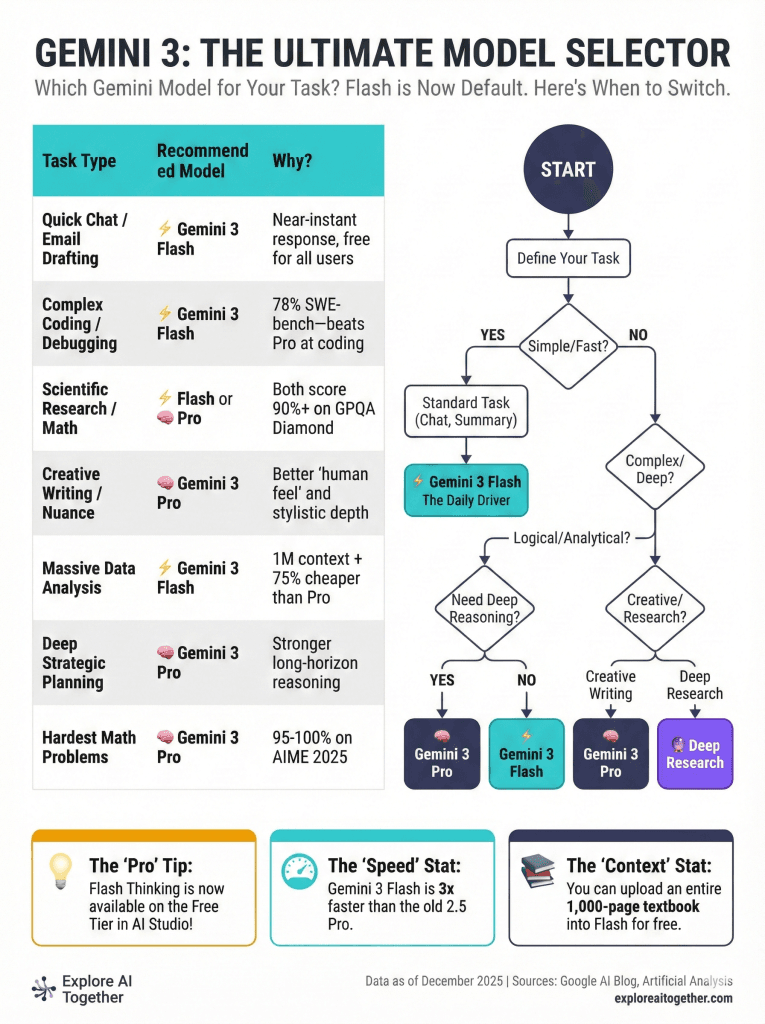
| Task Type | Recommended | Why |
|---|---|---|
| Quick chat, email drafts | Flash | Speed + free tier |
| Iterative coding (debugging, refactoring) | Flash | 78% SWE-bench, rapid feedback |
| Deep strategic planning | Pro | Stronger long-horizon reasoning |
| Scientific research | Tie | Both score 90%+ on GPQA |
| Creative writing with nuance | Pro | Better stylistic depth |
| Massive data analysis | Flash | 1M context + lower cost |
| Hardest math problems | Pro | 95-100% on AIME 2025 |
| High-volume production | Flash | 3x faster, 75% cheaper |
The “Pro Then Flash” Strategy
Here’s how sophisticated teams use both models together: Start with Pro to architect complex solutions and make strategic decisions. Once the plan is set, hand off implementation to Flash for rapid iteration and execution.
Think of it like a senior architect who designs the building, then hands detailed blueprints to a skilled construction team. Pro does the thinking; Flash does the building.
How to Access Gemini 3 Flash (Free and Paid Options)
For Consumers
Gemini App (Free): Flash is now the default model. Just open gemini.google.com or the mobile app and start chatting. Free tier users get limited quotas.
AI Mode in Search: Rolling out globally. Access advanced reasoning directly in Google Search.
Google AI Pro/Ultra Subscribers: Higher usage limits and access to Pro models alongside Flash.
For Developers
Google AI Studio: Free preview tier with generous limits. Great for prototyping.
Gemini API Pricing:
- Input: $0.50 per million tokens
- Output: $3.00 per million tokens
- Audio input: $1.00 per million tokens
- Context caching: Up to 90% cost reduction for repeated content
- Batch API: 50% savings for async processing
Gemini CLI: Update to version 0.21.1+, enable preview features in /settings, then use /model to select Gemini 3.
Vertex AI: Enterprise-grade deployment with production SLAs.
Google Antigravity: Free agentic development platform for building autonomous coding agents.
Third-Party Integrations
Flash is already integrated into Cursor, GitHub Copilot, JetBrains IDEs, Figma Make, Android Studio, and Salesforce Agentforce. Check your favorite tool’s model selector—Flash may already be available.
What Gemini 3 Flash Can’t Do (Yet)
No AI is perfect, and honesty about limitations builds trust. Here’s where Flash falls short:
Hallucination Risk on Obscure Facts
Flash scores 72.1% on SimpleQA Verified—solid, but not perfect for factual accuracy. Some independent tests report higher hallucination rates on obscure trivia where the model doesn’t know the answer but confidently guesses anyway.
Mitigation: For fact-critical tasks, enable Grounding with Google Search to let Flash verify claims against live web data.
No Image Segmentation
Unlike Gemini 2.5 Flash, the 3.0 models don’t support pixel-level image masks. If you need to isolate specific objects in images, continue using 2.5 Flash with thinking turned off, or consider specialized tools.
Computer Use Not Yet Supported
Gemini 3 models don’t yet support the “computer use” tools that let AI directly interact with desktop applications. For direct UI interaction, Claude Haiku 4.5 currently leads at 50.7%.
Knowledge Cutoff: January 2025
Flash’s training data ends in January 2025. For anything more recent—news, product launches, current events—use Search grounding to fetch live information.
Try Gemini 3 Flash Right Now (Quick Start Guide)
Step 1: Go to gemini.google.com or open the Gemini app
Step 2: Flash is now the default—you’re already using it
Step 3: Try a multimodal prompt to experience its capabilities
Sample Prompts to Test
Test multimodal understanding:
“Analyze this video and summarize the three most important points” (Upload any YouTube link or video file)
Test coding ability:
“Debug this Python function and explain what’s wrong:
def fibonacci(n): return fibonacci(n-1) + fibonacci(n-2)“
Test reasoning depth:
“Create a step-by-step plan for launching a mobile app, including timeline, budget considerations, and potential risks”
Pro tip: For complex tasks, explicitly ask Gemini to “think through this step by step” or “reason carefully before answering.” This nudges the model toward deeper analysis even at default settings.
Bonus: Generate Images with Nano Banana Pro
While we’re covering Gemini 3 Flash, it’s worth mentioning the image generation capabilities in the ecosystem:
Nano Banana (Gemini 2.5 Flash Image): Fast, fun image editing. Great for quick creative work, photo manipulation, and style transfers.
Nano Banana Pro (Gemini 3 Pro Image): Studio-quality generation with accurate text rendering, up to 4K resolution, and support for 14 reference images for style consistency. Access it in AI Mode by selecting “Thinking with 3 Pro” and choosing “Create Images Pro” (currently U.S. users).
If you need to create infographics, marketing materials, or any visual content with legible text embedded in the image, Nano Banana Pro is currently best-in-class for AI image generation.
Bottom Line: Is Gemini 3 Flash Worth It?
Gemini 3 Flash represents a genuine paradigm shift in AI accessibility. Frontier-level intelligence—the kind that scores 90%+ on PhD-level science benchmarks—is now available for free in the Gemini app and at a quarter of the cost of Pro for developers.
The “coding inversion” (Flash beating Pro at SWE-bench) proves that smaller, specialized models can outperform larger ones when optimized correctly. Google didn’t just make Pro faster—they created something different and, for many use cases, better.
Key Takeaways:
- ✅ Best free AI for most people — Now the default in Gemini app
- ✅ Excellent for coding — 78% SWE-bench, ideal for iterative “vibe coding”
- ✅ PhD-level reasoning — 90.4% GPQA, 33.7% Humanity’s Last Exam
- ✅ 3x faster than 2.5 Pro — With 30% fewer tokens on average
- ✅ Use Thinking Levels — Dial down to Minimal or Low for speed-critical tasks
- ⚠️ Watch for hallucinations — Use Search grounding for factual accuracy
- 💡 Upgrade to Pro only when necessary — For deep architecture and strategic planning
For most users, most of the time, Gemini 3 Flash is more than enough. And at this price and speed, “good enough” has never been this good.
Related guides: Gemini Deep Research Guide • NotebookLM vs Gemini • How to Use Gemini in Google Sheets