
“Vibe Coding” is a term that exploded this year – so much that Collins Dictionary named it the 2025 Word of the Year. But what does it actually mean? And what does it mean for those of us who are still early or intermediate in our AI journey, learning and experimenting together?
What is Vibe Coding? Software Built on Feelings
Vibe coding is a way of building software where you describe what you want in plain language, the AI writes the code, and you judge it purely by how it behaves.
You describe the goal, let the model generate an app, script, or feature, and then you “vibe check” it: click around, see if it feels right, and refine your description if it doesn’t. Natural language becomes your only interface to the codebase.
If you want a more in depth look at how to vibe code from my perspective as a beginner check out my related article: How to Vibe Code – A Beginner’s Step-By-Step Guide
How Vibe Coding Actually Works
The workflow is remarkably simple:
Step 1: Describe what you want in plain English. “Make a calculator that can handle percentages.”
Step 2: AI generates the code based on your description.
Step 3: Run it and see what happens. Does it work? Great. Does it break? Move to step 4.
Step 4: Describe the problem and let the AI fix it. “It crashed when I divided by zero. Fix that.”
This cycle repeats until you’re happy with the result. You’re the director giving notes. The AI is the crew making it happen.
The Empowerment Revolution
Here’s what makes vibe coding genuinely revolutionary: everyday people are turning passions into real software.
A disc golfer (me) builds a putting tracker to improve their game. A parent creates a meal planner that knows what’s actually in the fridge. A small business owner automates inventory without hiring anyone.
These aren’t professional programmers. They’re people with ideas and the excitement to build them.
Vibe coding removes the years of learning traditional programming requires. It replaces that with something anyone can do: describe what you want in natural language.
Your expertise in healthcare, finance, education, or any field matters more than knowing programming syntax.
The barrier between “I wish this existed” and “I built this myself” has collapsed.
When Vibe Coding Shines
Vibe coding excels in specific situations.
Rapid prototyping lets you test ideas in hours instead of weeks. Build something, show it to people, get feedback, iterate. The speed is unmatched.
Personal tools for your own use are perfect candidates. Low stakes, no other users, just solving your specific problem in your specific way.
Learning what’s possible with AI becomes hands-on. Instead of reading about capabilities, you experience them directly.
Weekend projects benefit from the instant gratification. Scratch that creative itch. Build something fun. See results immediately.
It shines in projects that are simple, personal, and unlikely to break anything important. Those are the moments where the speed feels fun rather than risky.
The Speed Advantage is Real
Compare the traditional path to the vibe path.
Traditional route: Hire a developer or wait for engineering capacity. Write requirements. Wait for implementation. Test. Request changes. Wait again. Days or weeks pass before you see anything.
Vibe coding route: Describe what you want. Watch it appear. Test. Refine. Done. Minutes to hours for results.
I vibe-coded a disc golf putting-tracker app in about three weeks – roughly twenty times faster than it would have taken in a traditional engineering process. I’ll share the full breakdown in a later article.
When Vibes Go Wrong
But speed comes with hidden costs. As projects move beyond quick experiments, specific problems emerge.
You Can’t Debug What You Don’t Understand
Day 1 feels magical. Your app works, and it came together faster than you ever expected.
Day 2 feels very different. Something breaks, you try to fix it, and you quickly realize you don’t actually know how anything works under the hood.
The code is a mix of styles pulled from different examples the model has seen. One file uses modern patterns, another uses techniques you have never seen before. Nothing fits together in a deliberate way. It just happens to work.
And when you don’t understand how the system is built, you can’t reliably fix it.
So you turn to the AI for help. It patches one issue, but creates another. That leads to one more patch, which creates another problem. You end up stuck in a cycle where each fix introduces a new break. The more you lean on the model, the more tangled things become.
Many vibe-coded projects collapse under this pattern. The app technically runs, but the foundation is shaky, and every small change feels like a risk. You are left with software that feels too fragile to touch.
The Codebase Outgrows the AI’s Memory
Even if the early pieces are consistent, larger projects bring a new set of problems: context and scale.
In my own early project, I managed to keep things aligned for a while, but the moment the app grew, context became impossible to manage. Each new chat was essentially like starting over. I had to remind the AI what we were building, what decisions we made, and how the pieces fit together. A huge part of my time went into rebuilding the conversation instead of writing features.
This is a common experience across the AI-coding community. Large language models cannot hold an entire codebase in memory once it gets beyond a certain size. They lose track of earlier decisions. Details drift. Names, patterns, and assumptions get overwritten or forgotten.
Workflows start to break down because the AI cannot reliably remember the project.
The good news is that better tools are emerging. Some approaches use shared project files as a stable source of truth. Others rely on retrieval systems or lightweight memory layers that let the AI recall important decisions without forcing you to repeat them. These solutions do not remove every challenge, but they make longer projects much more manageable than they used to be.
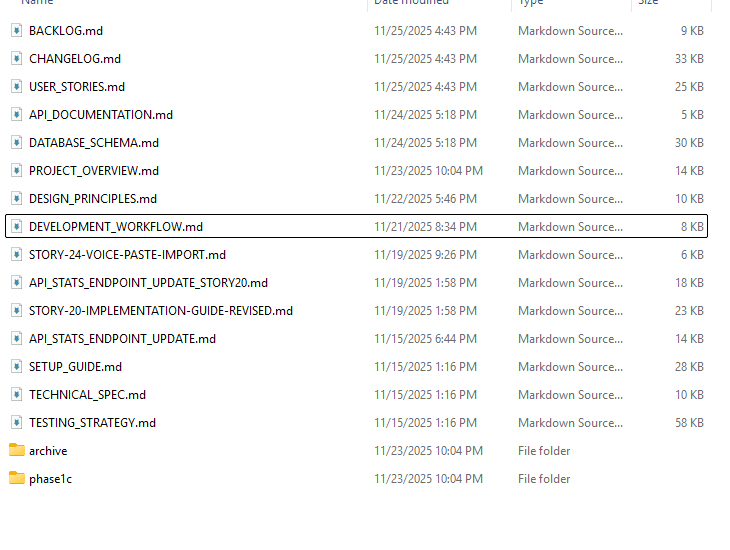
Before things got complicated, I put a lot of time into building a proper documentation suite. I created user stories, a database schema, technical specs, a development workflow, testing strategy, and a full project overview. That structure helped keep the project aligned for a long stretch, and it prevented many of the classic vibe-coding problems early on.
If you decide to build anything beyond a weekend experiment, this kind of preparation is worth it. Even if you plan to work conversationally with an AI, invest a little time upfront to create the documents that explain what your app is, how it works, and what decisions you’ve already made. It won’t solve every issue, but it gives you a foundation the AI can refer back to instead of guessing every time the chat window resets.
Security Becomes an Afterthought
Professional software treats security as foundational. Plan it from day one.
Vibe coding treats security as an afterthought—if it’s considered at all.
The database search problem: You ask for search functionality. The AI builds the simplest version. That version happens to be vulnerable to attacks. You don’t know this because you never reviewed the code.
The secrets problem: You’re excited to get features working. You paste your API keys into the chat. The AI hardcodes them into files. You commit everything to GitHub. Your secrets are now public.
The trust problem: The AI suggests installing software libraries. You accept without checking them. Some are malicious packages with similar names, hoping for exactly this kind of blind trust.
Real example: A credible study by Veracode — the 2025 GenAI Code Security Report — found that 45% of AI-generated code samples from 100+ LLMs introduced known security vulnerabilities. Another peer-reviewed large-scale analysis (October 2025) of public GitHub repositories that identified thousands of Common Weakness Enumeration (CWE) instances in AI-generated code — confirming that AI code often has patterns matching known security weaknesses.
It’s like wiring a house by throwing cables through the walls and hoping it works. The lights turn on, but the fire hazard is hidden.
Technical Debt Compounds at Machine Speed
Traditional development accumulates problems slowly. You make trade-offs knowingly. You document them. You plan to fix them later.
Vibe coding accumulates problems at machine speed. The AI generates thousands of lines per hour. Issues compound faster than you realize.
By the time you notice something’s wrong, the codebase is too complex to untangle without starting over.
The Sobering Statistics
Research tells a clear story:
- 45% of vibe-coded applications contain security vulnerabilities
- Only 9% get proper code review before going to production
- 25% of new startups in Y Combinator’s latest batch have codebases that are 95% AI-generated
The Spectrum: From Vibe to Structure
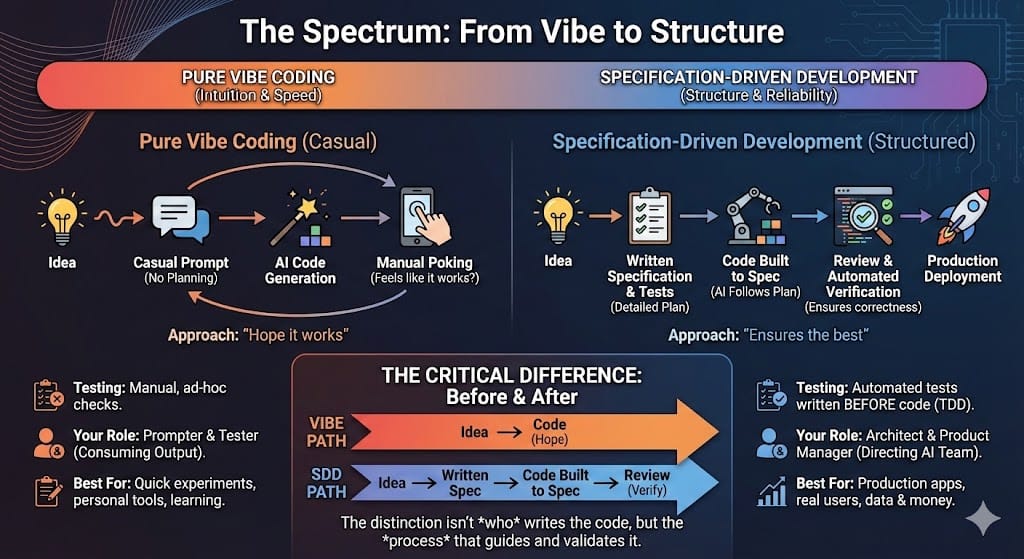
Not all AI-assisted development is vibe coding. There’s actually a spectrum of approaches.
Understanding this spectrum helps you choose the right method for what you’re building.
Pure Vibe Coding (Left Side)
How it works: Casual prompts with no planning or structure
Testing: Manual poking around. Does it feel like it works?
Your role: Prompter and tester. You’re consuming AI output.
Best for: Quick experiments, personal tools, learning
Specification-Driven Development (Right Side)
How it works: Write detailed specifications, then AI builds according to plan
Testing: Automated tests written before code
Your role: Architect and product manager directing an AI team
Best for: Production apps, real users, anything involving data or money
The Critical Difference
The distinction isn’t whether AI writes the code. It’s what happens before and after.
Vibe coding: Idea → Code (hope it works)
Specification-Driven Development: Idea → Written specification → Code built to spec → Review the result
Next: Moving From Vibes to Structure
In the next article, I’ll walk through exactly how I built ChainMate using Specification-Driven Development—the specific tools, the workflow that kept everything organized, and the “AI Council” approach that made it work. You’ll see the practical side of graduating from vibe to structure, including the lessons I learned (and mistakes I made) along the way.
Also check out Simon Willison’s article on vibe coding (Authoritative source – he’s a respected voice in AI development) if you want to learn more from an industry expert.
For my recommended tool for vibe-coding, use Claude Code for coding and Google AI Studio for quick, beautiful mock-ups