Updated November 27, 2025 — Now covers both Nano Banana and Nano Banana Pro
Nano Banana: Google’s AI Image Editor Explained
Here’s what made Nano Banana blow up: it solves the biggest frustration with AI image tools. You could always generate pictures from prompts, but editing existing photos, especially while keeping a person looking like themselves, was a mess.
Nano Banana (officially Gemini 2.5 Flash Image) changes that. It remembers faces across generations, makes surgical edits without wrecking the rest of the image, and merges multiple photos with matched lighting.
This guide walks you through everything: access, workflow, prompts, and the new Pro version that launched in November 2025.
What Exactly Is Nano Banana?
Nano Banana is Google’s image-generation and editing model that lives inside the Gemini app and AI Studio. Google uses the nickname officially—it reportedly came from the model’s compact speed (“nano”) and bright creative energy during internal testing.
Unlike older image AIs, Nano Banana isn’t just a prompt-to-picture generator. It’s an image editor that understands context. Give it two photos—say, you and a beach—and it can realistically merge them, keeping your same outfit, face, and lighting.
The Four Superpowers:
- Character Consistency — Upload a photo once, generate dozens of variations while keeping the same face, hair, and overall vibe.
- Pixel-Perfect Editing — Change one specific element without disturbing anything else. Swap a sofa color, remove a person from the background, adjust a logo.
- Multi-Image Fusion — Combine multiple photos into one coherent image with matched lighting and perspective.
- World Knowledge — Unlike pure image generators, Nano Banana taps into Gemini’s understanding of the real world. Ask it to restore a 1940s photo, and it knows historically accurate colors.
Nano Banana vs Nano Banana Pro: Which Should You Use?
Here’s something that changed since Nano Banana first went viral: Google released Nano Banana Pro on November 20, 2025, built on their new Gemini 3 model.
Now you have two image tools, designed for different jobs.
Nano Banana (Original) is fast and fun. Best for quick edits, casual creativity, and the figurine trend that started it all.
Nano Banana Pro is the professional upgrade. Native 2K resolution that upscales to 4K. Text rendering that actually works—readable words on posters and infographics. And it tracks up to 5 consistent characters across 14 reference images.
How to access each one:
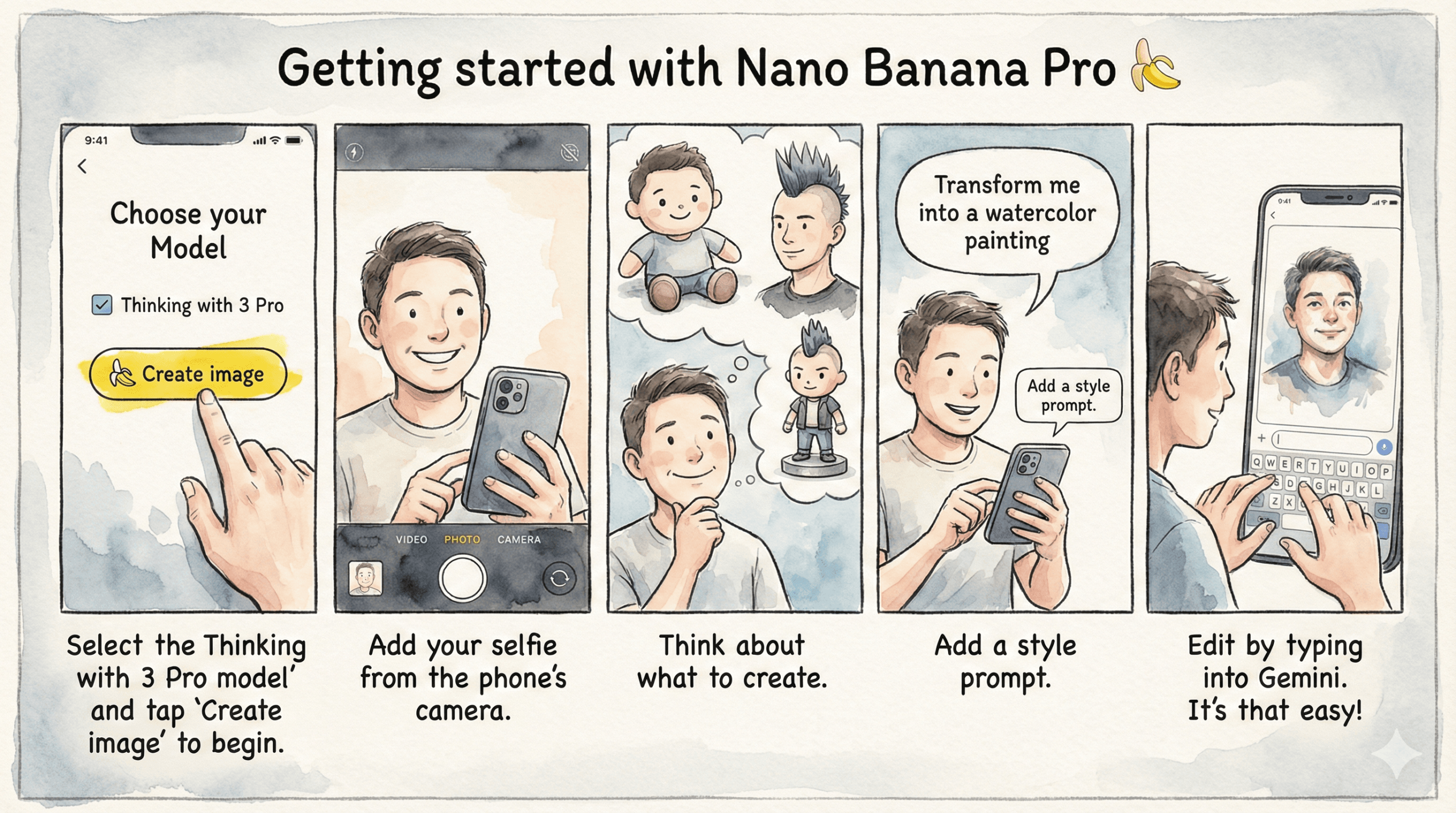
In the Gemini app, tap “🍌Create images” from the tools menu. Then:
- Select “Fast” → Original Nano Banana
- Select “Thinking” → Nano Banana Pro
Free users get limited Pro generations before reverting to original. Google AI Plus, Pro, and Ultra subscribers get highest access.
Quick decision: Use original for speed and casual work. Use Pro when output quality matters—client projects, marketing materials, anything where “close enough” isn’t good enough.
How to Use Nano Banana Step by Step
Let’s go from selfie to shelf-ready figurine in under 10 minutes.
Step 1: Choose a Base Image
Upload a clear, front-facing photo with good lighting. Simple backgrounds help Nano Banana lock onto your silhouette.
Step 2: Describe the Scene
Start broad: “Create a 3D miniature figurine of this person standing on a collector display base.”
Then refine: “Add soft studio lighting, 50mm lens feel, and a glossy retail box around them.”
Step 3: Iterate with Natural Language
Say things like “same pose, now make it metallic gold” or “change outfit to astronaut suit, same face.” Nano Banana reads that like a friend taking direction.
Step 4: Fix Identity Drift
If your subject starts looking different—wrong nose, hair, or eye color—upload the original again and mention “same person as reference photo.” That re-anchors identity.
Step 5: Export
Tap Download → Full resolution. Optional: run through Lightroom or Canva for minor tweaks.
[IMAGE PLACEMENT: Aspect Ratio Cheat Sheet – navy/teal version]
Aspect Ratios & Resolution
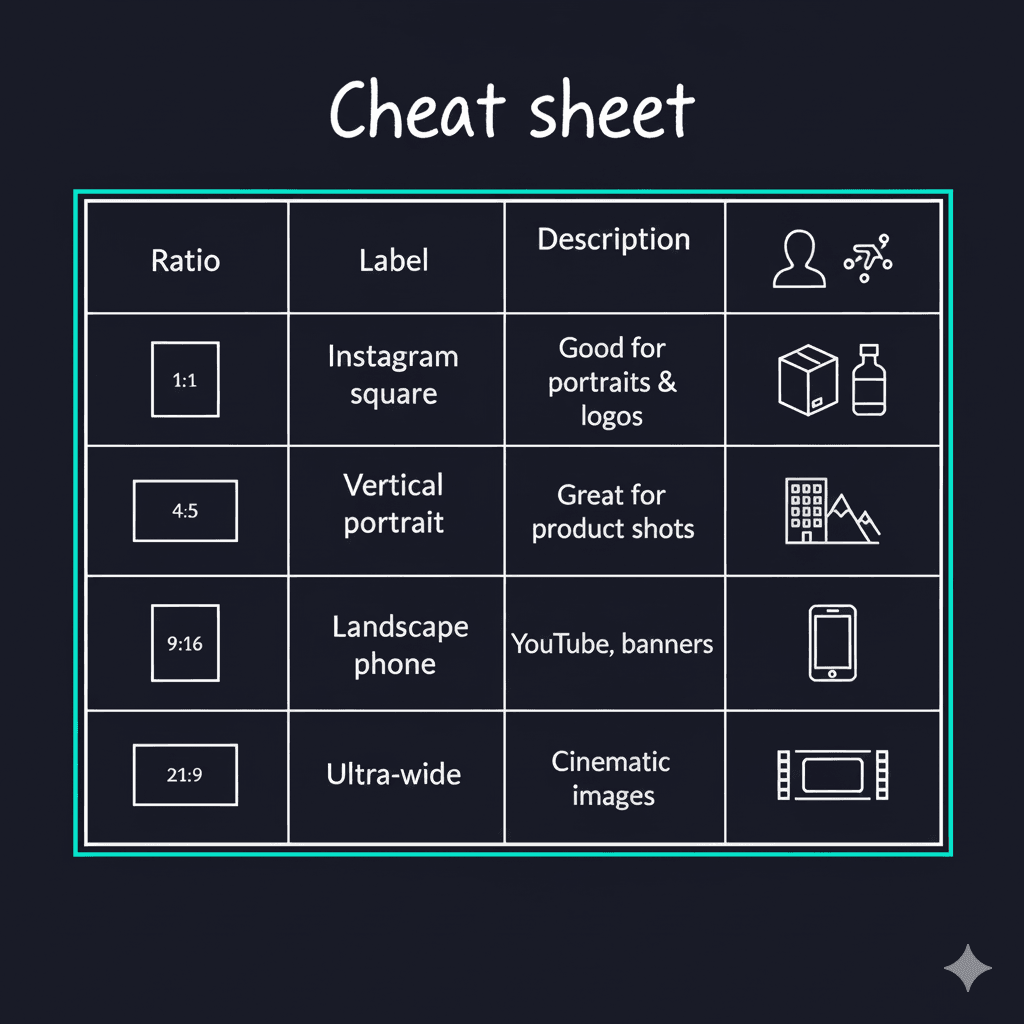
Nano Banana defaults to square (1:1) unless you specify. Add “in 16:9 aspect ratio” to your prompt for other formats.
Supported ratios: 1:1 (square), 16:9 (landscape), 9:16 (portrait/Stories), 4:5 (Instagram feed), 21:9 (ultrawide/cinematic)
Resolution: Original Nano Banana outputs up to 1024×1024px. Nano Banana Pro delivers native 2K with 4K upscaling.
Where to Access Nano Banana
Three access points:
- Gemini app (gemini.google.com) — Tap “🍌Create images,” choose Fast or Thinking mode
- AI Studio (aistudio.google.com) — For developers and builders
- Vertex AI — Enterprise integration
Daily limits: Free users get 100 images/day. Gemini Advanced subscribers get 1,000/day.
API pricing: $0.039 per image for original Nano Banana (each image = 1,290 tokens at $30/million output tokens).
New platforms (November 2025): Nano Banana Pro now works in Google Slides, Vids, NotebookLM, and the new Google Antigravity developer platform.
Prompt Library: 20 Ready-to-Use Examples
Figurines & Characters
- “3D miniature figurine of this person on a display base, dramatic key light”
- “Funko Pop style figure with oversized head, matte finish, retail box visible”
- “Action figure in dynamic pose, collector’s edition packaging”
Fashion & Style
- “Same person wearing streetwear outfit, editorial lighting”
- “Retro 1970s jumpsuit, same hairstyle, magazine cover shot”
- “Professional business attire, corporate headshot lighting”
Backgrounds & Lighting
- “Same person, neon cyber-city at night”
- “Golden hour sunlight, shallow depth of field”
- “Black-and-white portrait, moody film grain”
Style Transfer
- “Transform into Van Gogh’s Starry Night style—swirling brushstrokes, deep blues”
- “Apply watercolor painting style, soft edges, pastel colors”
- “Comic book panel style, bold ink outlines, halftone shading”
Product & Professional (Best with Pro)
- “Studio product shot on polished concrete, three-point softbox lighting”
- “E-commerce shot on white background, even lighting eliminating shadows”
- “Create infographic about [topic] with clear, legible text labels”
Advanced Editing
- “Change only the sofa color to navy blue, keep everything else identical”
- “Remove the person in background, preserve the rest”
- “Blend person from image 1 with beach background from image 2, matching lighting”
Pro tip: Start simple, then layer detail. Nano Banana handles additive edits better than complex first prompts.
Quick Fixes for Common Issues
Identity drift? Re-upload original photo, add “same person as reference photo”
Weird hands? Add “hands visible, relaxed pose, realistic fingers”
Plastic look? Add “matte finish, natural skin texture, avoid gloss”
Blurry edges? Add “sharp focus, crisp outline, 4K studio lighting”
Gibberish text? Use Nano Banana Pro (Thinking mode) for text-heavy images
Nano Banana vs Other AI Image Tools
vs. Midjourney: Midjourney excels at artistic generation from scratch. Nano Banana wins at editing existing photos and maintaining character consistency. Use Midjourney for concept art, Nano Banana for photo manipulation.
vs. DALL-E 3: DALL-E has better text rendering (though Pro closes this gap) and ChatGPT integration. Nano Banana offers superior character consistency and true editing capabilities.
vs. Stable Diffusion: Stable Diffusion is free and unlimited with full control, but requires technical setup. Nano Banana works instantly in your browser with no configuration.
Bottom line: Many professionals use multiple tools. Nano Banana for photo editing and character work, Midjourney for artistic concepts, Stable Diffusion for high-volume needs.
Professional Workflow Integration
Nano Banana → Photoshop: Adobe’s Generative Fill now includes Gemini as a partner model option. Generate in Nano Banana, polish edges and color-grade in Photoshop.
Nano Banana → Canva: Export full resolution, upload to Canva, add text overlays and brand elements, resize for social platforms.
November 2025 update: Adobe and Figma have announced official Nano Banana Pro integrations. Google also launched Google Antigravity, where coding agents can generate UI mockups using Nano Banana Pro directly.
FAQ
Why is it called Nano Banana? Google uses the nickname officially. It reportedly combines “nano” (compact speed) with bright creative energy from internal testing.
What’s the difference between Nano Banana and Nano Banana Pro? Original uses Gemini 2.5 Flash—fast and fun. Pro uses Gemini 3—higher resolution (up to 4K), better text rendering, handles 5 consistent characters across 14 reference images. Access original via “Fast” mode, Pro via “Thinking” mode.
Can I use it without uploading a photo? Yes. Text-only prompts generate from scratch, though results shine with reference images.
Does it work on mobile? Yes, both Android and iOS via the Gemini app.
Can I use images commercially? Yes, subject to Google’s terms of service. All images include invisible SynthID watermarks marking them as AI-generated.
Wrap-Up
Nano Banana isn’t just another AI toy—it’s a creative upgrade for everyone who’s wanted professional-grade edits without the learning curve.
Start simple: upload a selfie, try the figurine prompt, then follow your curiosity. Maybe next week you’ll be turning your cat into a space explorer or mocking up your next product shoot in five minutes.
The gap between imagination and execution just got thinner—and a little more banana-shaped.